

Bootstrap business workflow automation is the practice of using low-cost or free software tools to automate repetitive business tasks without large upfront investment or dedicated IT support. The industry term for this is business process automation, and it covers everything from sending invoice reminders to routing new leads into your CRM. For UK business owners watching every pound, the good news is that a functional automation stack can cost as little as $0 to $50 per month using tools like Make, Zapier, and ChatGPT Plus. That price point makes serious automation accessible to sole traders, growing SMEs, and lean executive teams alike.
What is bootstrap business workflow automation?
Bootstrap business workflow automation means building your automation stack with minimal spend and no specialist engineers. You rely on no-code or low-code platforms that connect your existing apps through pre-built integrations. The goal is to remove manual, repetitive work from your team's day so they can focus on decisions that actually require human judgement. Done well, it pays back its cost within weeks, not years.
The term "bootstrapped" comes from the startup world, where founders build companies without external funding. Applied to automation, it means the same discipline: spend only what you must, prove value fast, and expand from there. This approach suits the majority of UK businesses, which are small or medium-sized and cannot justify enterprise software contracts.

Which workflow automation tools suit bootstrapped UK businesses?
The right tools are those your team can set up, run, and fix without calling a developer. If a platform requires a dedicated IT admin, it is too heavy for a bootstrapped organisation. Success is measured by time saved and speed of adoption, not by feature count.
The table below compares the most widely used platforms for UK businesses starting out with process automation.
| Tool | Free tier | Paid from | Best for | Ease of use |
|---|---|---|---|---|
| Make | 1,000 ops/month | ~£9/month | Multi-step workflows | Medium |
| Zapier | 100 tasks/month | ~£16/month | Simple app connections | Easy |
| ChatGPT Plus | No free tier | ~£16/month | AI reasoning in workflows | Easy |
| Notion AI | Built into Notion | ~£8/month | Document and task automation | Easy |
| Buffer | Limited posts | ~£5/month | Social media scheduling | Very easy |
Make and Zapier are the two dominant workflow automation tools for bootstrapped teams. Make handles more complex, multi-step logic at a lower price point. Zapier is faster to set up and better suited to straightforward trigger-action tasks, such as adding a new Typeform response to a Google Sheet and sending a Slack notification. ChatGPT Plus adds AI reasoning to either platform, letting you summarise emails, classify leads, or draft responses inside an automated flow.
Free or sub-$50/month tools enable startups to automate customer support, content creation, lead generation, and back-office tasks with no engineering overhead. That breadth of coverage means most UK businesses can automate their highest-friction processes before spending a meaningful amount.
Pro Tip: Start with Zapier's free tier to prove a workflow works, then migrate to Make once you need multi-step logic. You will save money and avoid rebuilding from scratch.
How do you identify which workflows to automate first?
The highest-return workflows share two traits: they happen frequently, and they require little human judgement. Invoice payment reminders, new lead notifications, appointment confirmations, and social media post scheduling all qualify. Each one takes a human two to five minutes per instance, but across hundreds of instances per month, the cumulative time loss is significant.
Business process mapping is the structured way to find these opportunities. Walk through each department's daily tasks and mark every step that is purely mechanical: copying data from one system to another, sending a standard email, updating a spreadsheet. Those steps are your automation candidates.
AI augments human judgement rather than replacing it, and that distinction matters for prioritisation. Automate the data processing and the notifications. Keep humans in the loop for anything involving a client relationship, a financial decision, or a complaint. This approach, known as augmentation, produces better outcomes in early-stage automation than attempting full end-to-end replacement.
You can also use a simple scoring method. Rate each candidate workflow on two axes: frequency per week and minutes saved per instance. Multiply the two numbers. The workflows with the highest scores go first.
- Invoice payment reminders (daily, 3 minutes each)
- New enquiry notifications from your website contact form
- Weekly sales report generation from CRM data
- Social media post scheduling from a content calendar
- Onboarding email sequences for new clients
- Internal task creation when a deal moves stage in your CRM
Pro Tip: Automate one workflow completely before starting the next. Partial automations create confusion and are harder to debug than a single, finished process.
Step-by-step: how to set up your first automated workflow
A working automation stack for a UK small business requires three components: a trigger app (where the process starts), a workflow tool (Make or Zapier), and an action app (where the result lands). ChatGPT Plus sits in the middle when you need AI to process or generate content.
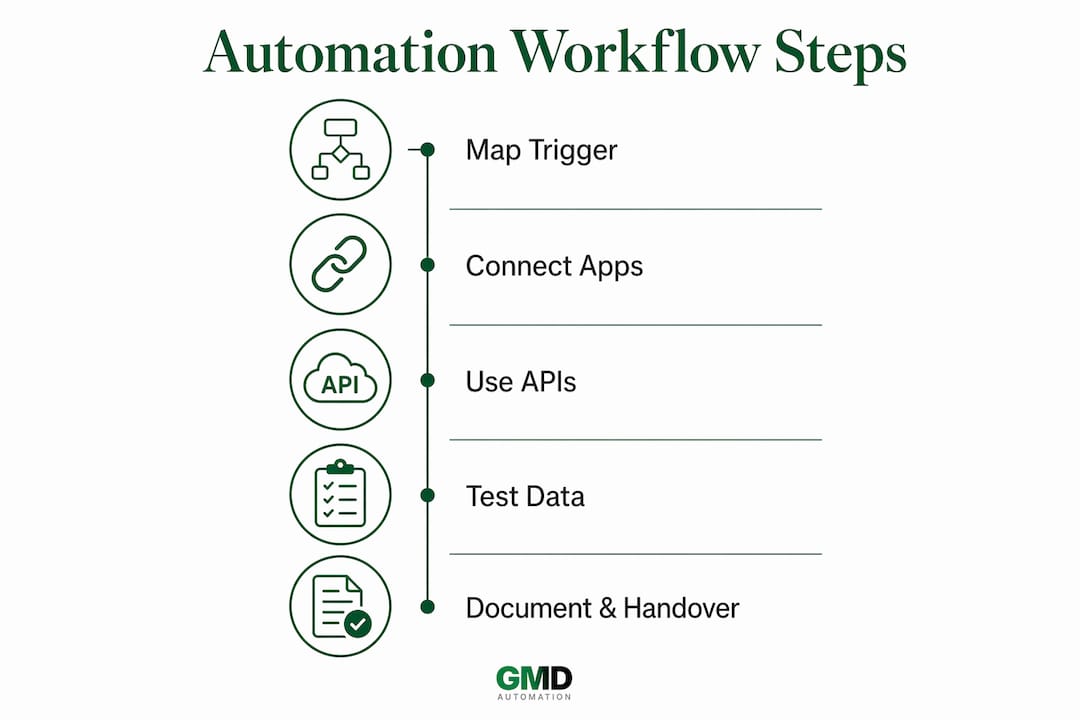
Step 1: Map your trigger and action
Write the workflow as a plain sentence before touching any software. Example: "When a new lead submits our contact form on Typeform, add their details to our HubSpot CRM and send them a welcome email via Mailchimp." That sentence defines your trigger (Typeform submission), your data destination (HubSpot), and your output (Mailchimp email).
Step 2: Build in Make or Zapier
Connect your apps using the platform's pre-built connectors. Both Make and Zapier support thousands of UK business tools including Xero, Shopify, HubSpot, Slack, and Google Workspace. Map the data fields carefully. A mismatch between a form field name and a CRM field name is the most common cause of failed automations.
Step 3: Use APIs, not screen scraping
True process automation orchestrates work at the integration layer using APIs, not by replicating what a human does on screen. UI-based automation (clicking buttons, scraping web pages) breaks every time the interface changes. API-based automation is stable, fast, and does not depend on visual layouts. Make and Zapier both use APIs by default, which is one reason they are the right starting point. For more on this, the API integration guide from Gmdautomation covers the technical principles in plain language.
Step 4: Test with real data before going live
Run the workflow with a real test submission. Check every output: did the CRM record appear correctly? Did the email send? Did the Slack notification fire? Fix errors at this stage, not after the workflow has processed 500 live records incorrectly.
Step 5: Document and hand over
Write a one-page summary of what the workflow does, which apps it connects, and what to check if it stops working. This documentation means any team member can maintain it, not just the person who built it.
| Step | Action | Tool |
|---|---|---|
| 1. Map the workflow | Write trigger and action as a plain sentence | Pen and paper |
| 2. Connect apps | Use pre-built connectors | Make or Zapier |
| 3. Add AI reasoning | Insert ChatGPT step for content tasks | ChatGPT Plus |
| 4. Test thoroughly | Run with real data and check all outputs | Make or Zapier |
| 5. Document | Write a one-page maintenance guide | Google Docs or Notion |
Pro Tip: Make's WhatsApp integration lets UK businesses automate client notifications via WhatsApp without custom development. It is one of the fastest ways to add visible automation value for client-facing teams.
How do you maintain and scale automated workflows sustainably?
The biggest risk in business process automation is not failure at launch. It is the slow accumulation of complex, fragile workflows that nobody fully understands six months later. Complex automation systems increase failure points and maintenance effort. Build systems that a single operator can maintain and debug without specialist help.
Practical maintenance comes down to four habits:
- Review each workflow monthly. Check error logs in Make or Zapier and fix any failed runs before they become patterns.
- Keep each workflow to a single purpose. A workflow that does five things is five times harder to debug than one that does one thing.
- Set up error notifications. Both Make and Zapier can email you when a workflow fails. Turn this on from day one.
- Avoid building automations for tasks you do fewer than ten times per week. The time spent building and maintaining automation must be less than the cumulative manual time saved within a few months.
Scaling works best when you automate the handoffs between systems rather than entire departmental processes. Inefficiencies occur at the data transfer gaps between tools, not usually within a single tool. Fix those gaps first. Once your core handoffs run reliably, you can layer in more complex logic.
"Founders often mistake automation complexity for value. Simple, reliable systems offer better long-term return on investment." — Bootstrapping.org
For small teams using AI automation, the principle is the same: one person should be able to own the entire automation stack. If that is no longer true, the stack has grown too complex for its current stage.
Key takeaways
Bootstrap business workflow automation delivers the strongest results when you focus on simple, high-frequency tasks, use API-based tools like Make or Zapier, and build only what one person can maintain.
| Point | Details |
|---|---|
| Start with low-cost tools | Make, Zapier, and ChatGPT Plus cover most needs for under £50 per month. |
| Prioritise high-frequency tasks | Automate processes that happen daily and require no human judgement first. |
| Use APIs, not UI automation | API-based workflows are stable and do not break when interfaces change. |
| Keep workflows simple | Each automation should do one thing so any team member can maintain it. |
| Measure by time saved | If building the automation takes longer than the manual saving, do not build it. |
Why simple beats clever every time
I have worked with dozens of UK business owners who came to automation with the same instinct: build something impressive. They wanted multi-branch logic, AI scoring, conditional routing, and automatic escalation. Within three months, half of those workflows had broken, been abandoned, or were being quietly bypassed by staff who found them unreliable.
The businesses that got the most value from automation did the opposite. They picked one painful, repetitive task, automated it cleanly, and left it alone. A recruitment firm in Leeds automated its candidate acknowledgement emails. A London-based accountancy practice automated its monthly report distribution. Neither workflow was clever. Both saved hours every week and ran without incident for over a year.
The uncomfortable truth about automating business tasks is that the value is almost never in the technology. It is in the discipline of choosing the right process and keeping the solution simple enough that it never needs a specialist to fix it. AI augmentation, where a tool like ChatGPT handles a classification or a draft while a human makes the final call, consistently outperforms full automation in early-stage businesses. The human stays accountable. The machine handles the volume.
My advice to any UK business owner starting out: resist the urge to automate everything at once. Pick your single most painful manual task, build one clean workflow, and measure the time you get back. That result will tell you exactly where to go next.
— Ravi
How Gmdautomation supports UK businesses with workflow automation
Gmdautomation builds AI automation systems for UK businesses that want the benefits of process automation without the overhead of building and maintaining it themselves.
For businesses that have outgrown the DIY approach or want enterprise-grade reliability from day one, Gmdautomation offers a subscription model with no upfront costs. Implementation, maintenance, and ongoing improvement are all included. The platform is built for UK compliance requirements and can be deployed quickly across sectors from professional services to retail. If you are ready to move beyond spreadsheet fixes and manual workarounds, explore AI automation solutions from Gmdautomation to see what a fully managed system looks like in practice.
FAQ
What is bootstrap business workflow automation?
Bootstrap business workflow automation is the practice of using low-cost or free tools like Make, Zapier, and ChatGPT Plus to automate repetitive business tasks without large upfront investment or specialist IT support.
How much does a basic automation stack cost?
A functional automation stack costs as little as $0 to $50 per month using the free tiers of Make and Zapier combined with ChatGPT Plus. Most UK small businesses can cover their core automation needs for under £30 per month.
Which workflows should I automate first?
Automate high-frequency, low-judgement tasks first: invoice reminders, lead notifications, appointment confirmations, and report generation. These deliver the fastest time savings with the least risk.
Should I use Make or Zapier for my first automation?
Zapier is easier to set up for simple trigger-action workflows. Make offers more complex logic at a lower price point. Start with Zapier to prove the concept, then migrate to Make if you need multi-step branching.
When does automation stop being worth it?
Automation stops being worth it when the time spent building and maintaining a workflow exceeds the cumulative manual time it saves. If a task happens fewer than ten times per week, the payback period is rarely short enough to justify the build.