

AI automation for small teams is defined as the practice of deploying software to execute repetitive, rule-based business tasks without human intervention at each step. The most effective small teams focus automation on high-volume operational work: invoice processing, lead follow-up, customer support triage, and reporting. Tools like Zapier, Make, and n8n allow non-technical staff to build these workflows in an afternoon, connecting thousands of apps without writing a single line of code. Understanding how small teams use AI automation well means starting with the workflow, not the technology, and measuring every result from day one.
Which tasks should small teams automate first?
Targeting repetitive, high-volume tasks first is the single fastest route to ROI for any small team. The reason is straightforward: the more often a task recurs, the more time automation recovers each week. Below are the five workflows where small teams consistently see the fastest returns.
- Invoice lifecycle management. Invoice work consumes 8 to 15 hours per week across creation, sending, follow-up reminders, and reconciliation. The hidden cost is not the invoice itself but the mental load of remembering which clients have not paid and sequencing the right reminders at the right time. Automating this with tools like Claude Code or Xero integrations removes that burden entirely.
- Lead capture and CRM follow-up. When a prospect fills in a form, an automated workflow can log the contact in your CRM, send a personalised acknowledgement, and schedule a follow-up task, all within seconds. Without automation, this sequence typically falls through the gaps in a busy week.
- Customer support triage. AI-powered chatbots classify incoming queries, answer common questions, and route complex issues to the right team member. This reduces first-response times without adding headcount.
- Reporting and analytics. AI reporting automation generates narrative summaries from raw data, turning a two-hour manual task into a scheduled output that lands in your inbox every Monday morning.
- HR onboarding. New starter workflows can trigger contract emails, IT provisioning requests, and training task assignments automatically on the day an offer is accepted.
Pro Tip: Map each candidate task by weekly frequency before you build anything. A task that takes 20 minutes but happens 30 times a week is a far better automation target than one that takes two hours but happens once a month.
What tools enable low-cost AI automation for small teams?
The barrier to entry for AI automation tools has dropped sharply. Zapier alone connects over 9,000 apps, and its free tier is sufficient to prototype most initial automations. Here is a practical sequence for getting started without a technical team.
- Choose a no-code platform. Zapier, Make, or n8n each offer visual workflow builders where you connect a trigger (a new row in a Google Sheet, a form submission, an inbound email) to one or more actions. No custom software development is required. For teams wanting self-hosted options, n8n is open source and free to run on your own server.
- Add an AI step. Once a basic trigger-action pair is working, you can insert an AI step using OpenAI's API or a native AI feature within Zapier. This step might classify an email, generate a reply draft, or extract structured data from a document. Embedding AI via APIs requires no custom development when using these platforms.
- Test with real data. Run the workflow on ten real examples before activating it fully. Edge cases appear quickly, and catching them early prevents errors at scale.
- Monitor and refine. Check workflow logs weekly for the first month. Most failures are caused by upstream data quality issues, not the automation logic itself.
- Layer complexity gradually. Once a two-step workflow is stable, add conditional logic, multi-step branching, or additional AI interpretation. Complexity added too early is the most common reason small team automations fail.
Pro Tip: Start with Zapier's free tier for your first automation. If you hit the task limit within a month, that is a strong signal the workflow is delivering enough value to justify a paid plan.
How do small teams measure ROI from AI automation?

AI automation ROI for small businesses typically runs at 12 to 20 times tool costs in the first month. That figure sounds dramatic, but the arithmetic is straightforward. Tool spend for a small team usually sits between £25 and £65 per month. If automation recovers even three hours of staff time per week at an average hourly cost of £20, the monthly saving exceeds £240. The ratio is compelling because the tool cost is fixed while the time saving scales with usage.
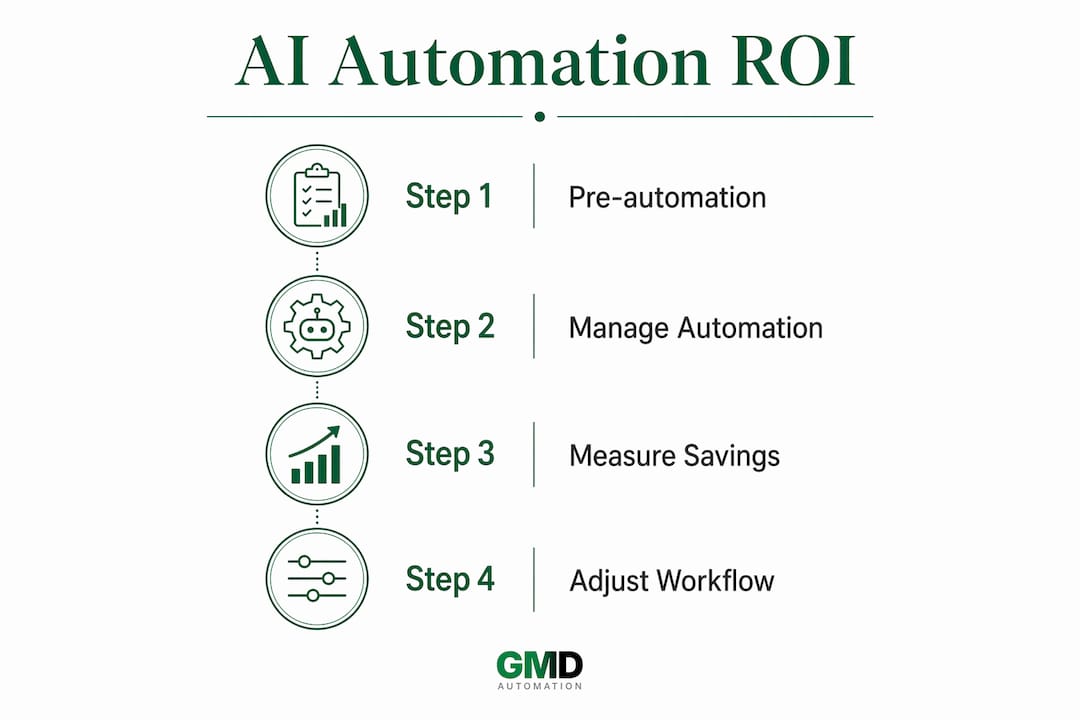
Measuring this honestly requires three data points: time spent on the task before automation, time spent managing the automation after deployment, and the direct monthly cost of the tools involved. Honest ROI accounting must include build time in the first month, since a workflow that takes six hours to build and saves two hours per week breaks even in three weeks. That is still an excellent return.
The most common pitfall is automating a broken process. If your invoice follow-up workflow is inconsistent because the underlying data in your CRM is unreliable, automation will execute that inconsistency faster and at greater scale. Fix the process first, then automate it. A useful discipline is to calculate automation payback before building, not after.
Pro Tip: Deploy one automation per month for the first quarter. Measure the time saving after 30 days before starting the next one. This cadence builds confidence, surfaces problems early, and creates a clear evidence base for further investment.
| Metric | What to measure |
|---|---|
| Pre-automation time | Hours per week spent on the task manually |
| Post-automation time | Minutes per week spent reviewing and managing the workflow |
| Tool cost | Monthly subscription cost allocated to this workflow |
| Break-even point | Weeks until recovered time value exceeds build time plus tool cost |
What compliance rules apply to small teams using AI?
The EU AI Act contains no minimum size exemption for SMEs. Your obligations are determined by the risk level of your AI use case, not the size of your organisation. This surprises many small business leaders who assume regulation is only for large enterprises.
The practical implication is manageable. Most common small business AI applications, including chatbots, email drafting, and data classification, fall into the minimal or limited risk categories. These carry lighter obligations: transparency disclosures and basic documentation rather than full conformity assessments.
- Disclose AI involvement. If a chatbot handles customer queries on your website, users must be informed they are interacting with an AI system. This applies regardless of team size.
- Inventory by function, not vendor. Compliance planning is clearest when you list AI uses by business function (sales, support, finance) rather than by tool name. This reveals risk concentrations that a tool-by-tool list misses.
- Maintain human oversight on high-stakes decisions. Credit assessments, hiring decisions, and medical triage require human review even when AI assists. Build approval gates into these workflows from the start.
- Log AI activity. NIST AI RMF guidance recommends tracking what your AI systems do, when they do it, and what outputs they produce. For SaaS tools, this often means enabling audit logs within the platform settings.
"Governance is not a barrier to AI adoption for small teams. It is the foundation that makes adoption sustainable. A team that documents its AI use cases in a single spreadsheet is already ahead of most."
How do small teams start and scale AI automation sustainably?
A workflow-first approach consistently outperforms starting with AI model capabilities. The question is not "what can this AI do?" but "which process is costing us the most time right now?" That reframe changes everything about how you prioritise and build.
- Identify your highest-volume repetitive task. Count how many times it happens per week and how long each instance takes. This single number determines your automation priority.
- Build a two-step workflow. A trigger and a single action. Nothing more. Test it with real data until it works reliably 95% of the time before adding anything else.
- Add an AI interpretation step. Once the base workflow is stable, insert a classification or generation step. For example, have an AI model read an inbound support email and tag it by category before routing it to the right team member.
- Establish human oversight checkpoints. For any customer-facing or financially significant output, build a review step where a team member approves before the action executes. This is not inefficiency. It is risk management that builds trust in the system.
- Scale over 90 days. Deploy one workflow per month, measure its impact at the 30-day mark, and use that data to select the next candidate. By month three, you will have three working automations and a clear picture of where the next opportunity lies.
Pro Tip: Keep a simple log of every automation you build: what it does, when it was deployed, and what time it saves per week. This log becomes your business case for further investment and your audit trail for compliance purposes.
The signs that your business is ready to scale beyond single workflows typically appear around the 90-day mark: staff are no longer doing the tasks that were automated, errors in those areas have dropped, and the team is asking what else can be handled the same way.
Key takeaways
Small teams achieve the strongest AI automation results by targeting high-volume, repeatable tasks first, measuring ROI honestly, and scaling one workflow at a time over 90 days.
| Point | Details |
|---|---|
| Start with high-volume tasks | Invoice processing, lead follow-up, and support triage deliver the fastest time savings. |
| Use no-code platforms | Zapier, Make, and n8n connect thousands of apps without requiring technical staff. |
| Measure ROI before and after | Compare pre-automation hours against tool costs to validate each workflow's return. |
| Comply by risk, not size | EU AI Act obligations apply to SMEs based on use case risk, not company headcount. |
| Scale one workflow per month | A 90-day cadence builds confidence, surfaces problems early, and creates a clear evidence base. |
Why the knowledge gap matters more than the cost gap
The main barrier to AI adoption in small businesses is not cost. It is knowledge. Twenty per cent of small business owners use AI only for drafting emails or social posts, which means the majority of operational automation potential goes untapped. That gap is not a technology problem. It is a prioritisation and confidence problem.
What I have observed consistently is that teams who start with a single, well-defined workflow and measure it rigorously become converts within weeks. The first automation that saves a team member three hours a week does more to build internal confidence than any amount of reading about AI capabilities. The technology is not the hard part. Deciding where to start is.
Governance concerns put off more small teams than they should. A spreadsheet listing your AI tools, what they do, and who reviews their outputs is a legitimate starting point for compliance. You do not need a legal team to build that. You need 90 minutes and the willingness to be honest about what your tools are actually doing.
The competitive advantage for small teams is real. A five-person team running well-designed automations for invoice management, lead follow-up, and customer support can operate with the responsiveness of a team three times its size. That is not a theoretical benefit. It shows up in response times, error rates, and the capacity of your people to focus on work that actually requires human judgement.
— Ravi
Start your AI automation journey with Gmdautomation
Gmdautomation builds AI automation systems specifically for UK businesses, with zero upfront costs and a predictable monthly subscription that covers deployment, maintenance, and ongoing optimisation. If you have identified a workflow that is costing your team time every week, the next step is a conversation about what automation would look like in practice for your specific context.
Gmdautomation's AI automation platform is designed for teams that want enterprise-grade reliability without enterprise-grade complexity. Every system is built for UK compliance requirements, scales as your needs grow, and comes with the support to make adoption straightforward from day one. Whether you are automating your first invoice workflow or coordinating cross-department AI processes, Gmdautomation provides the infrastructure and expertise to make it work.
FAQ
What is the easiest AI automation for a small team to start with?
Lead follow-up and invoice reminders are the most accessible starting points because they involve clear triggers and predictable actions. Platforms like Zapier allow non-technical staff to build these workflows without coding.
How much does low-cost AI automation for small teams typically cost?
Tool costs for small teams typically range from £25 to £65 per month for platforms like Zapier or Make. ROI of 12x to 20x on those costs is achievable in the first month when targeting high-volume tasks.
Does the EU AI Act apply to small businesses using AI tools?
Yes. The EU AI Act applies based on the risk level of your AI use case, with no size exemption for SMEs. Most common small business applications fall into minimal or limited risk categories with lighter compliance requirements.
How long does it take to build a first AI automation workflow?
A simple two-step workflow using a no-code platform can be built and tested in an afternoon. Tasks like lead capture and data syncing are commonly implemented without IT support in a single session.
How do small teams avoid common AI automation mistakes?
The most frequent mistake is automating a broken or poorly defined process. Fix the underlying workflow first, document it clearly, then automate it. Adding human oversight checkpoints on customer-facing outputs prevents errors from reaching clients before the system is proven reliable.