

Automated customer service workflows are technology-driven processes that handle customer interactions and support tasks without requiring manual input at every step. Rather than a human agent reading each incoming query and deciding what to do, the system uses triggers, routing logic, and pre-defined actions to move work through the right channels automatically. The result is faster resolution, fewer errors, and support teams freed up for the conversations that genuinely need a person.
The core components of any automated support process look like this:
- Triggers: an incoming email, a submitted form, or a chat message that starts the workflow
- Routing logic: rules that direct the query to the right team, bot, or backend system
- Automated actions: responses sent, tickets created, records updated, or refunds initiated without human input
- CRM and system integration: connection to customer data so the automation has context before it acts
- AI layer: natural language processing (NLP) to understand what the customer actually means, not just what they typed
Platforms like n8n describe this architecture clearly: triggers fire automated actions that handle queries end-to-end, with CRM integration giving each step the data it needs. The AI layer is what separates modern automated workflows from the rigid, rule-based scripts of a decade ago.
Table of Contents
- What technologies power customer service automation?
- Why UK businesses are investing in automated support processes
- Real-world use cases: what automated workflows actually do
- How to implement automated customer service workflows
- What does the future of AI in customer service look like?
- How Gmdautomation supports UK businesses with AI automation
- Gmdautomation: AI automation built for UK businesses
- Key takeaways
What technologies power customer service automation?
Three technology families do most of the work when businesses automate customer service workflows: AI and language models, workflow orchestration platforms, and system integration tools.
AI and language technologies sit at the front of the customer interaction. Natural language processing lets a system understand intent from free-text messages. Machine learning improves accuracy over time by learning from past interactions. Generative AI is becoming more common and can draft contextually relevant replies rather than pulling from a fixed script.
Workflow orchestration platforms are the connective tissue. Low-code and no-code tools let IT teams and technically minded business managers build, test, and adjust automation without writing everything from scratch:
- Microsoft Power Automate offers many prebuilt connectors to systems including Dynamics 365, SAP, and Salesforce, plus robotic process automation (RPA) for desktop applications that have no API
- n8n combines a visual builder with the option to write JavaScript or Python for complex logic, making it a strong fit for technical teams who need flexibility
- Zapier connects thousands of apps through a trigger-and-action model, with AI orchestration built in for teams that want to add intelligence without heavy development
System integration is where automation moves beyond simple replies. APIs and pre-built connectors link your customer service desk to CRM, ERP, and payment systems. That connection is what allows a workflow to do something transactional, such as processing a refund or updating an address, rather than just sending an acknowledgement email. Low-code platforms like n8n make this kind of end-to-end orchestration accessible without a full engineering team behind every workflow.
Robotic process automation (RPA) fills the gaps where APIs do not exist. It mimics human interaction with desktop software, which matters for UK businesses still running legacy systems alongside modern cloud tools.

Why UK businesses are investing in automated support processes
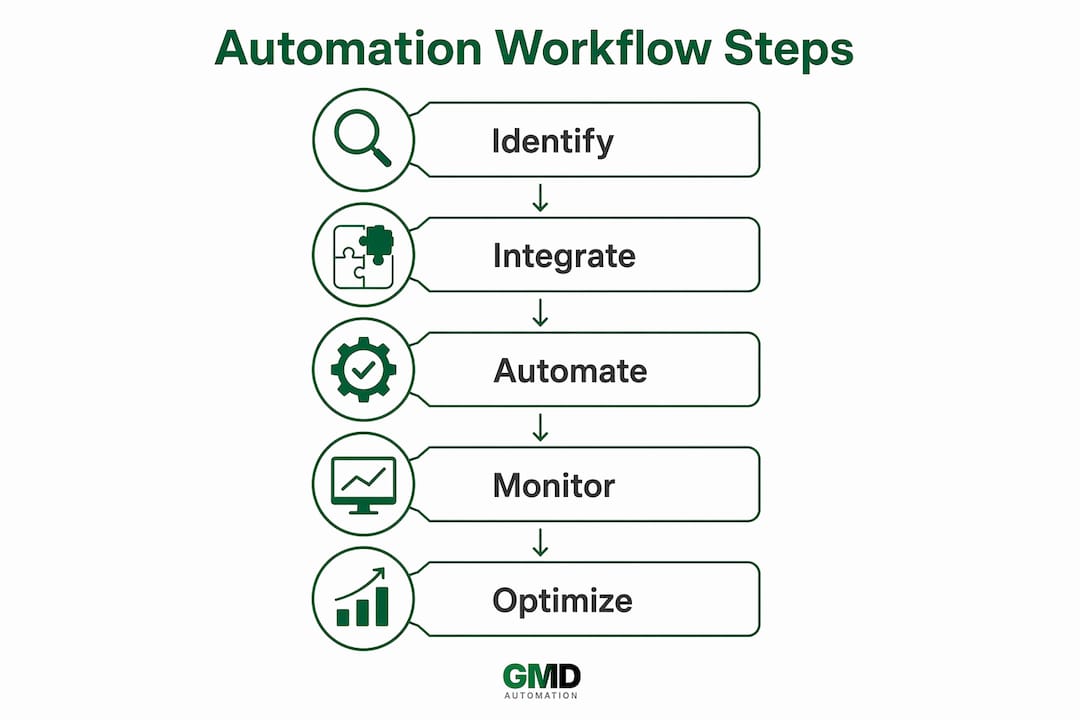
The business case for automating customer service is straightforward, and UK organisations are feeling the pressure from multiple directions: rising customer expectations, tighter operating budgets, and a labour market that makes scaling support headcount expensive.
Enterprise automation platforms document measurable improvements across operational costs, response times, and customer satisfaction when automation is applied to support workflows. The gains are not marginal. Automated routing alone removes the manual triage step that often adds hours to first-response time.
The specific benefits for UK businesses include:
- Faster response times: automated triage and routing mean queries reach the right person or get resolved entirely without a queue
- Reduced workload for support teams: repetitive tasks such as password resets, order status checks, and FAQ responses are handled without agent involvement
- Cost efficiency: fewer manual touchpoints per ticket reduces the cost per resolution, which matters when support volumes spike seasonally
- Consistency: every customer gets the same quality of response regardless of which agent is on shift or how busy the queue is
- Compliance and data governance: automated workflows apply the same data-handling rules every time, reducing the risk of human error in regulated industries such as financial services
- Scalability: a workflow that handles 100 tickets a day can handle 10,000 with no additional headcount, which is particularly relevant for UK retailers ahead of peak trading periods
Statistic callout: Enterprise studies consistently document reduced operational costs and improved customer satisfaction scores when automation is applied to support workflows, with compliance and governance benefits particularly pronounced in regulated UK sectors.
The compliance point deserves emphasis. UK businesses operating under GDPR and FCA regulations face real risk when customer data is handled inconsistently. Automated workflows enforce the same data-handling logic every time, which is harder to guarantee when the process depends on individual agents making the right call under pressure.
Pro Tip: Before building the business case internally, map your current cost-per-ticket and average first-response time. These two figures give you a concrete baseline against which to measure the impact of automation, and they tend to be persuasive with finance teams who are sceptical of technology investment.
Real-world use cases: what automated workflows actually do
The most common starting point for businesses is ticket routing. Every incoming query gets classified by topic and urgency, then directed to the right team or resolved automatically if it falls into a known category. Zapier documents this as one of the most widely deployed automation patterns: a trigger fires when a ticket arrives, AI classifies the intent, and routing rules send it where it needs to go.
Beyond routing, the use cases that deliver the most visible impact include:
- Chatbot FAQ resolution: a customer asks about delivery times or return policy and gets an accurate, instant answer without an agent reading the message
- Follow-up message workflows: after a ticket is closed, an automated message requests feedback or confirms resolution, with no manual step required
- Backend system updates: a customer submits a change-of-address request and the workflow updates the CRM, notifies the fulfilment system, and sends a confirmation, all without a human touching the record
- Refund processing: the workflow validates the request against order data, applies business rules, triggers the payment reversal, and sends the customer a confirmation
- Attachment processing: invoices and delivery notes attached to tickets are read by OCR and AI, with key fields extracted and pre-filled automatically so agents start with structured data rather than a PDF to open
Sector-specific applications in the UK are worth noting. Retail businesses use automated workflows to handle the surge in order queries during peak periods without hiring temporary staff. Financial services firms automate the initial stages of complaint handling, ensuring every complaint is logged, categorised, and acknowledged within regulatory timeframes. Telecoms providers use automated workflows to handle fault reporting, routing technical queries to the right engineering team while sending the customer a reference number and estimated resolution time.
Pro Tip: Start with the use case that has the highest ticket volume and the most predictable resolution path. Password resets, order status checks, and standard FAQ queries are ideal first candidates because the logic is simple and the volume justifies the effort of building the workflow.

For a broader view of AI process automation wins across industries, the pattern is consistent: the highest returns come from automating the predictable, repetitive work first, then expanding into more complex orchestration once the foundation is solid.
How to implement automated customer service workflows
Implementation is where most projects either succeed or stall. The technology is rarely the problem. The issues tend to be unclear scope, poor integration planning, and insufficient attention to how staff will work alongside the new system.
A practical sequence looks like this:
- Audit your current workflows. Map every step in your most common support processes. Identify which steps are repetitive, rule-based, and high-volume. These are your automation candidates.
- Define success metrics before you build. Set specific targets for first-response time, resolution rate, and cost per ticket. Without a baseline, you cannot measure whether the automation is working.
- Choose your platform based on your IT environment. If your team has developers, a platform like n8n gives you the flexibility to handle complex logic. If you need business users to build and adjust workflows without IT involvement, a no-code tool is more practical. No-code platforms let teams build and adjust workflows quickly without creating IT bottlenecks.
- Integrate with your CRM and existing systems first. Automation without data is just a faster way to give wrong answers. Connect your workflow platform to your customer data before you build the logic on top of it. API integration guidance for IT leaders covers the technical considerations in detail.
- Build and test on a single workflow. Do not attempt to automate everything at once. Pick one high-volume, low-complexity process, build it, test it with real data, and measure the result before expanding.
- Plan for escalation. Every automated workflow needs a clear path to a human agent when the system cannot handle the query. Customers who hit a dead end in an automated system are more frustrated than those who waited for a human from the start.
- Train your support team on the new process. Automation changes what agents do, not whether they are needed. Staff who understand how the system works, and what it cannot do, will handle escalations better and spot problems earlier.
- Monitor KPIs continuously. Successful implementation depends on ongoing monitoring of performance metrics and willingness to adjust workflows when the data shows a problem.
Tines emphasises that stepwise integration, staff training, and continuous KPI monitoring are the factors that separate successful automation rollouts from expensive failures.
Common pitfalls to avoid:
- Automating a broken process. If the manual workflow is inefficient, automating it makes the inefficiency faster, not better. Fix the process logic first.
- Skipping the integration step. A chatbot that cannot access order data cannot resolve order queries. Integration is not optional.
- Underestimating change management. Support teams who feel threatened by automation will find ways to work around it. Involve them in the design process.
- Measuring the wrong things. Deflection rate is a popular metric, but a high deflection rate combined with low customer satisfaction means you are deflecting queries badly. Measure resolution quality, not just volume.
Pro Tip: Low-code and no-code platforms let business and IT teams build and adjust workflows without waiting for a development sprint. This flexibility is particularly valuable in the first three months of deployment, when you will almost certainly need to revise the logic based on real customer behaviour.
What does the future of AI in customer service look like?
The direction of travel is clear: automation is becoming more capable, more connected, and more autonomous. The question for UK businesses is not whether to adopt it, but how quickly and how deeply.
Key trends shaping the next phase of customer service automation:
- Generative AI in customer-facing interactions: rather than selecting from pre-written responses, AI systems are generating contextually appropriate replies in real time. This raises the quality ceiling for automated responses significantly, particularly for complex or nuanced queries.
- Agentic automation: emerging developments point towards AI agents that can take sequences of actions across multiple systems without human approval at each step. An agent might handle a complaint end-to-end, from logging to resolution to follow-up, with a human reviewing the outcome rather than approving each action.
- Human-in-the-loop workflows: the counterbalance to agentic automation is a growing emphasis on keeping humans in the decision chain for high-stakes or ambiguous situations. The best implementations in 2026 are not fully automated or fully manual. They are designed to route the right cases to humans and let automation handle everything else.
- Enhanced security and governance: as automation handles more sensitive customer data, the governance requirements grow. Platforms are building audit logging, role-based access controls, and AI guardrails directly into the workflow layer rather than treating them as add-ons.
- Deeper orchestration across systems: the boundary between customer service and back-office operations is dissolving. Workflows that once stopped at sending an acknowledgement now reach into ERP systems, payment processors, and logistics platforms to take action. This is where the business outcomes from automation become genuinely transformative rather than incremental.
The businesses that will extract the most value from these trends are those that have already built the integration layer. Agentic AI cannot act across systems it is not connected to. The groundwork laid now, connecting CRM, ERP, and support platforms through well-designed workflows, is what makes the next generation of automation possible.
How Gmdautomation supports UK businesses with AI automation
Gmdautomation is built specifically for UK enterprises that want enterprise-grade AI automation without the capital expenditure and implementation risk that typically come with it. The model is straightforward: a monthly subscription covers deployment, operation, maintenance, and ongoing refinement of the AI systems, with no upfront costs and no requirement for an in-house AI engineering team.
The platform's approach to customer service automation reflects the practical realities of UK business IT environments:
- Secure, compliant deployment: systems are designed with UK data governance requirements in mind, including GDPR compliance built into the workflow layer rather than bolted on afterwards
- Integration with existing infrastructure: Gmdautomation works with the CRM, ERP, and support platforms already in place, rather than requiring businesses to replace their current stack
- Fast deployment: the subscription model includes implementation, which means businesses are running live workflows in weeks rather than months
- Ongoing optimisation: the monthly model includes continuous refinement based on performance data, so the system improves over time without requiring internal resource to manage it
- Educational support: Gmdautomation publishes practical guidance on topics including AI automation for UK businesses, helping teams understand what is possible before committing to a deployment
Pro Tip: If your organisation is evaluating AI automation for the first time, Gmdautomation's demo agent gives you a working example of how the deployment systems perform in practice, without requiring a sales conversation first.
The subscription model removes the two barriers that most commonly delay automation adoption in UK businesses: the upfront cost of implementation and the ongoing cost of maintaining a system that evolves as AI capabilities change. Both are covered within the monthly fee.
Gmdautomation: AI automation built for UK businesses
Most UK businesses that want to automate customer service workflows face the same problem: the technology is available, but deploying it properly requires integration work, compliance consideration, and ongoing management that most internal teams are not resourced to handle. Gmdautomation exists precisely for that situation.
The concrete difference is the subscription model. Rather than a large upfront project cost followed by a maintenance contract, Gmdautomation covers implementation, operation, and optimisation within a single predictable monthly fee. There is no capital expenditure, no separate maintenance budget, and no need to hire AI specialists internally. For UK businesses that need to move quickly without taking on financial risk, that structure changes the calculation entirely.
The platform is designed for organisations that already have CRM and support systems in place and need AI automation layered on top, not a wholesale replacement of their existing infrastructure. Gmdautomation integrates with what you have, builds the workflows your support operation needs, and keeps them performing as your business changes.
To see how it works for your specific operation, explore Gmdautomation's AI solutions and request a demonstration of the deployment systems in action.
Key takeaways
Automating customer service workflows delivers the greatest returns when integration with existing systems is prioritised from the start, and when implementation follows a phased, metric-driven approach.
| Point | Details |
|---|---|
| Start with high-volume, simple workflows | Ticket routing, FAQ resolution, and order status checks deliver fast results with low implementation risk. |
| Integration comes before automation logic | Connect your CRM and backend systems first; automation without customer data cannot resolve queries accurately. |
| Monitor KPIs continuously post-deployment | Track first-response time, resolution rate, and customer satisfaction to identify and fix underperforming workflows. |
| Future-proof with agentic and generative AI | Emerging agentic workflows and generative AI responses are raising the ceiling on what automated support can handle. |
| Gmdautomation for UK deployment | Gmdautomation's monthly subscription covers implementation, compliance, and ongoing optimisation for UK enterprises with no upfront cost. |