

AI reduces manual tasks by acting as an execution-layer assistant that drafts, summarises, and restructures information within workflows, freeing your team to focus on decisions that actually require human judgement. By mid-2026, this shift is most visible in high-volume administrative functions such as HR, finance, and customer support, where AI acts as a first layer that handles the grunt work before a human ever touches it. The result is not just time saved. It is a fundamental change in how work flows through an organisation.
How AI reduces manual tasks across your workflows
The standard industry term for this capability is intelligent process automation, which combines AI with rule-based automation to handle both structured and unstructured work. Understanding where it applies is the first step to getting value from it.

AI is most effective on tasks that are repetitive, format-driven, and information-heavy. These are the tasks where human effort adds little creative value but where errors are costly and volume is high. AI compresses mental load by producing the first structured draft, which reduces working memory pressure and lets your team focus on review and refinement rather than creation from scratch.
The task categories where AI delivers the clearest results include:
- Data entry and validation: AI reads, extracts, and populates fields from documents, emails, and forms without manual re-keying.
- Summarisation: Long reports, meeting transcripts, and email threads are condensed into concise outputs in seconds.
- Document drafting: Contracts, proposals, and policy documents are generated from templates and structured inputs.
- Format conversion: AI converts data between spreadsheets, PDFs, and databases without manual reformatting.
- Customer support triage: AI classifies, routes, and drafts responses to incoming queries before a human agent reviews them.
- Payroll and HR administration: Leave requests, onboarding checklists, and compliance reports are processed automatically.
Tasks requiring genuine creativity, ethical judgement, or nuanced relationship management remain firmly in human hands. AI does not replace those. It clears the path to them.
Pro Tip: Start by listing every task your team repeats more than ten times per week. If the output follows a predictable format, it is almost certainly a candidate for AI automation.
What is workflow compression and why does it matter?
Workflow compression is the process of removing redundant manual steps, data re-entry points, and formatting handoffs from a business process. AI-driven workflow compression reduces friction between steps, allowing tasks to move faster through an organisation and keeping focus on outcomes rather than process mechanics.
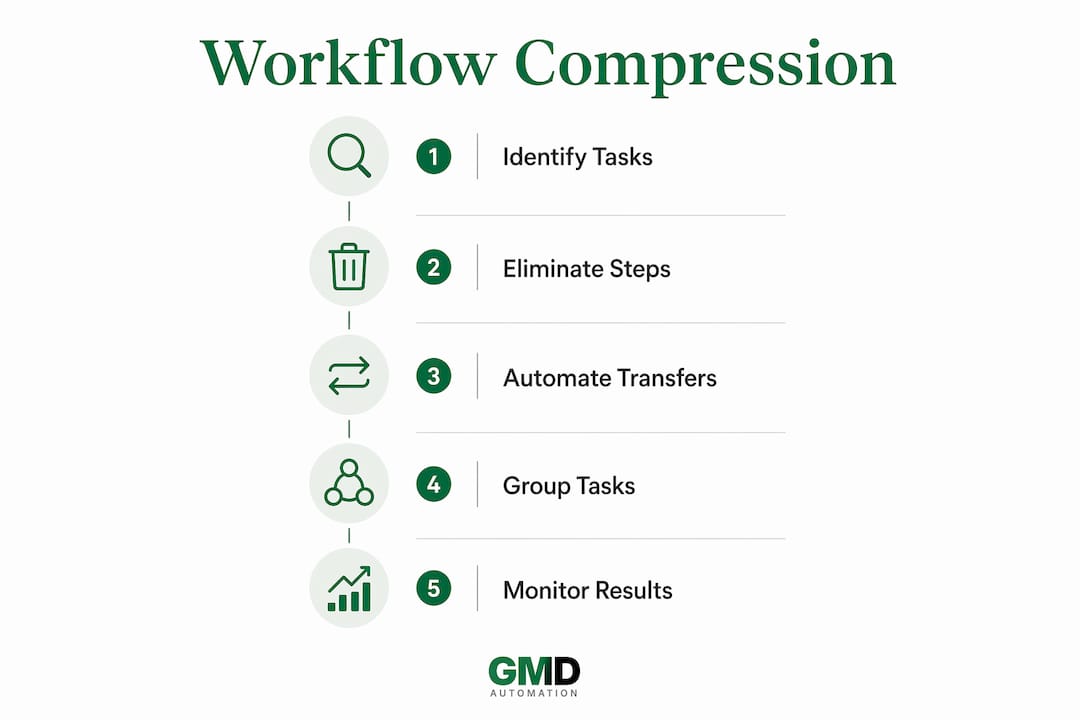
The critical distinction here is between layering AI onto a broken workflow and redesigning a workflow for AI. Most businesses make the first mistake. They add an AI tool to an existing process without changing how the process is structured. The result is marginal improvement at best. MIT Sloan research confirms that significant productivity gains occur when organisations rethink workflows rather than automate isolated steps.
The table below illustrates the difference in practice:
| Stage | Traditional workflow | AI-compressed workflow |
|---|---|---|
| Data collection | Manual form entry, email chasing | AI extracts data from emails and documents automatically |
| Summarisation | Employee reads and writes summary | AI produces draft summary; employee reviews |
| Approval routing | Manual email chain with attachments | AI routes to correct approver with context attached |
| Reporting | Analyst compiles data from multiple sources | AI aggregates and formats report; analyst interprets |
| Follow-up | Manual calendar reminders and chasing | AI monitors deadlines and sends contextual follow-ups |
The table makes the pattern clear. Every stage where a human previously acted as a relay, AI now handles the transfer. The human role shifts from execution to oversight.
Pro Tip: Map your current workflow end-to-end before introducing any AI tool. Identify every point where a person is simply moving information from one place to another. Those are your compression targets.
Redesigning for AI also means grouping compatible tasks together. Grouping compatible tasks and minimising handoffs produces greater productivity gains than automating each step in isolation. Think of it as batching work so AI can execute a sequence rather than a single action.
What is agentic AI and how does it improve task management?
Agentic AI is AI that does not just respond to prompts. It thinks, plans, and acts to execute sequences of tasks with minimal human intervention. ADP describes agentic AI in HR as capable of delivering scalable, compliant automation that balances autonomy with human oversight to produce consistent, trustworthy outcomes.
The shift from generative AI to agentic AI is the key transition for businesses serious about reducing manual effort at scale. Generative AI answers a question. Agentic AI completes a job. An AI executive agent can, for example, receive a new employee onboarding request, create the user accounts, schedule induction meetings, send welcome communications, and flag any missing documentation, all without a human coordinating each step.
Traditional task management relies on to-do lists, calendar reminders, and manual handoffs between team members. Agentic AI replaces that model with dynamic, outcome-driven queues. Agent-native task management transforms static lists into queues managed by AI agents that prioritise, assign, and execute tasks based on business logic rather than human memory.
The practical benefits for business managers include:
- Reduced coordination cost: AI handles the scheduling, chasing, and routing that currently consumes management time.
- Lower cognitive load: Managers review outcomes rather than tracking every intermediate step.
- Consistent execution: AI follows the same process every time, removing variability caused by human fatigue or oversight.
- Faster throughput: Chained AI task sequences reduce overhead from reviews and handoffs, speeding operations even when individual steps are not perfect.
An AI worker agent operating within a payroll workflow, for instance, can validate timesheets, flag anomalies, calculate deductions, and prepare the payroll run for final human sign-off. The human approves. The AI executes. That division of labour is where the real efficiency gain lives.
What practical steps can businesses take to implement AI?
Implementing AI to reduce manual effort works best when it follows a phased approach. Attempting to automate complex, low-volume tasks first is the most common reason early AI projects fail. Starting with repetitive, format-driven tasks where output criteria are clear gives teams early wins and builds confidence for broader adoption.
A phased approach that works in practice looks like this:
-
Audit your manual tasks. List every recurring task your team performs. Note the frequency, the format of the output, and the skill level required. Tasks that are frequent, formatted, and low-judgement are your first targets. Use the AI automation checklist for operations managers as a structured starting point.
-
Redesign before you automate. Map the workflow end-to-end. Remove steps that exist only because of legacy manual processes. Simplify handoffs. Then introduce AI into the redesigned process, not the old one.
-
Build reusable prompts and templates. AI performs consistently when given consistent instructions. Create a library of prompts for your most common tasks: summarising meeting notes, drafting client emails, generating weekly reports. Treat these as standard operating procedures.
-
Integrate AI into existing tools. AI adoption fails when it requires staff to use a separate platform. Embed AI within the tools your team already uses, whether that is your CRM, your HR system, or your project management software. Explore types of business processes AI can automate to identify integration points.
-
Shift team habits from execution to supervision. Teams benefit most from AI when they move from doing the work manually to reviewing, refining, and improving AI-generated outputs. This requires deliberate change management. Explain the shift clearly. Measure time saved. Reinforce the new behaviour.
-
Measure and expand. Track time saved, error rates, and throughput for each automated process. Use that data to identify the next wave of tasks to automate. Scale what works.
The businesses that get the most from AI are not the ones that buy the most tools. They are the ones that redesign their operations around AI's strengths and manage the human transition carefully.
Key takeaways
AI reduces manual tasks most effectively when businesses redesign workflows around AI's strengths rather than layering tools onto existing broken processes.
| Point | Details |
|---|---|
| AI as a first layer | AI drafts, summarises, and formats outputs so humans focus on review and decisions. |
| Workflow compression | Removing redundant manual steps produces greater gains than automating isolated tasks. |
| Agentic AI for task management | Agentic AI executes chained task sequences autonomously, reducing coordination costs. |
| Start with low-risk tasks | Repetitive, format-driven tasks with clear outputs are the safest and most effective starting point. |
| Shift from execution to supervision | Teams must move from doing manual work to reviewing AI outputs for AI adoption to sustain. |
Why workflow redesign matters more than the tools you choose
I have spoken with dozens of business owners who bought AI tools expecting immediate results and felt let down within three months. The tools were not the problem. The workflows were.
The uncomfortable truth is that AI placed inside a broken process makes the process faster at being broken. The businesses I have seen succeed with AI are the ones that spent time mapping their workflows before touching a single tool. They identified where humans were acting as relays, moving information from one place to another without adding value, and they eliminated those steps entirely.
Human-in-the-loop is not a weakness in an AI system. It is the design feature that makes AI trustworthy in a business context. AI generates the draft. A human applies context, catches the edge cases, and makes the final call. That division of labour is not temporary. It is the right model for most business decisions.
The cultural shift is harder than the technical one. Managers who have spent years valuing effort and execution need to start valuing supervision and judgement. That is a genuine change in how performance is measured and recognised. Get that right, and the productivity gains from AI become self-reinforcing. Get it wrong, and your team will revert to manual habits within weeks.
— Ravi
How Gmdautomation helps UK businesses cut manual work
Gmdautomation builds AI automation systems specifically for UK businesses, with a focus on reducing the manual effort that drains operational capacity. Their systems link tasks and data across your existing workflows, minimising the points where humans must intervene to move information or trigger the next step.
Gmdautomation deploys enterprise-grade AI automation with no upfront costs, covering implementation, operation, maintenance, and ongoing improvement under a single monthly subscription. That model removes the capital risk that stops most UK businesses from committing to AI at scale. If you are ready to see what AI-driven workflow compression looks like in practice, Gmdautomation offers a demo built on the same systems they deploy for clients.
FAQ
What types of tasks does AI reduce most effectively?
AI reduces manual effort most effectively on repetitive, format-driven tasks such as data entry, document drafting, summarisation, and report generation. Tasks requiring human judgement, creativity, or ethical reasoning remain outside AI's reliable scope.
What is workflow compression in the context of AI?
Workflow compression is the removal of redundant manual steps, data re-entry points, and formatting handoffs from a business process. AI achieves this by handling information transfer between stages automatically, reducing friction and speeding throughput.
What is agentic AI and how does it differ from standard AI tools?
Agentic AI plans and executes sequences of tasks autonomously, rather than simply responding to individual prompts. ADP identifies agentic AI as the key to scalable, compliant automation in functions like HR and payroll, where multiple dependent steps must be completed in order.
How should a business start reducing manual tasks with AI?
Start with repetitive, low-risk tasks that have clear output formats, such as weekly reports or customer query triage. Redesign the workflow first, then introduce AI into the simplified process rather than the original one.
Does AI replace employees when it reduces manual tasks?
AI shifts employee effort from manual execution to supervision, review, and improvement of AI-generated outputs. This change increases the value of human work rather than eliminating it, provided the organisation manages the transition deliberately.