

No-code AI integration is defined as the practice of connecting AI models and automated workflows to business systems without writing a single line of code. Business professionals can now build AI agents, automate repetitive tasks, and connect data sources using visual drag-and-drop builders. The barrier is no longer technical skill. It is clarity of purpose. This guide covers the prerequisites, step-by-step process, common pitfalls, and best practices for teams ready to integrate AI tools into no-code platforms and see real results.
What do you need to integrate AI tools into no-code platforms?
The foundation of any successful no-code AI project is a well-defined business use case. No-code AI platforms enable business teams to build AI agents without engineers, using visual drag-and-drop builders to combine AI models and tools. That accessibility is powerful, but it only delivers results when the goal is specific and measurable.

Before selecting any platform, teams need three things in place: a clear description of the task the AI must perform, access to the relevant data sources, and the API credentials for any external services the workflow will call. Without these, even the best platform produces unreliable outputs.
Core features to look for in a no-code AI platform
Most capable platforms share a common set of features. They offer a visual canvas for building workflows, pre-built connectors to popular apps, and support for AI models such as Claude, GPT, and Gemini. No-code AI tools connect to apps via credentials and enable agents to answer from custom content using retrieval augmented generation (RAG). RAG means the AI draws on your own documents and databases rather than generic training data alone.
| Feature category | What to look for |
|---|---|
| Visual workflow builder | Drag-and-drop canvas with logic branching |
| AI model connectors | Support for multiple models (Claude, GPT, Gemini) |
| App integrations | Pre-built connectors for CRM, email, and databases |
| Authentication management | Centralised credential storage and OAuth support |
| API access | REST endpoint generation from completed workflows |
This table reflects the minimum viable feature set. Teams evaluating entry-level platforms should confirm all five categories before committing.
Pro Tip: Check whether the platform generates a REST API endpoint from your workflow automatically. This single feature determines whether your AI automation can connect to your existing business systems.
How to integrate AI tools into no-code platforms step by step
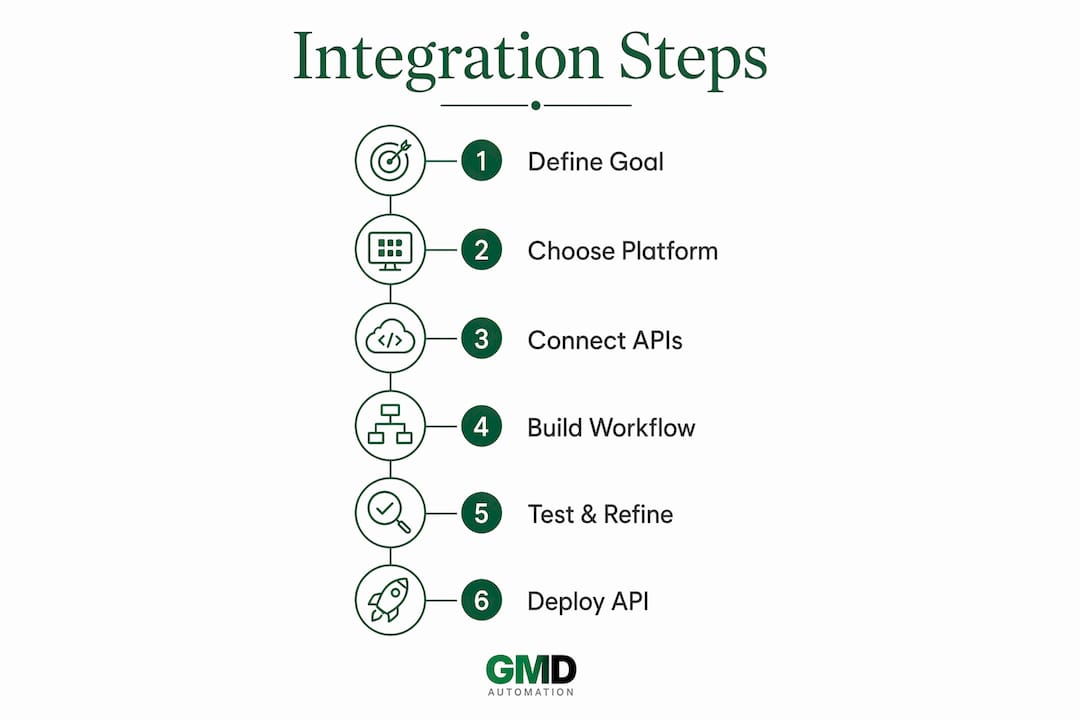
Step 1: Define the automation goal
The most common reason AI agent projects fail is vague instructions, not technical complexity. Most failed AI agent projects stem from unclear use case definitions rather than coding issues. Write a "master recipe" that specifies the data inputs, the decisions the AI must make, and the outputs it should produce. A customer support triage agent, for example, needs defined categories, escalation rules, and response formats before any platform is opened.
Step 2: Select a compatible no-code platform
Choose a platform that supports the AI models and app connectors your use case requires. Review the types of AI APIs available for enterprise integration before committing to a platform. Some platforms specialise in chat-based agents; others focus on data pipelines or document processing. Match the platform's strengths to your specific workflow.
Step 3: Connect AI services via API keys or platform connectors
Most no-code platforms handle authentication through a credentials panel. Enter your API keys for the AI models and external services your workflow needs. Managed authentication in AI integration platforms includes OAuth flows, token rotation, and credential management, removing complexity from builders. A single configuration per tool category means all your workflows inherit access without scattered secrets.
Step 4: Build the workflow visually
Use the platform's drag-and-drop canvas to arrange the sequence of actions. Connect triggers (such as a form submission or an incoming email) to AI processing steps, then to output actions (such as sending a reply or updating a CRM record). Keep each workflow focused on one task. Combining multiple unrelated tasks in a single workflow makes debugging significantly harder.
Step 5: Test with real inputs and refine
Run the workflow with actual business data, not placeholder text. Review the AI's outputs against your master recipe. Adjust the instructions, refine the prompt wording, and re-test until outputs meet your quality standard. This iteration phase is where most of the real work happens, and it is entirely manageable without developer support.
Step 6: Deploy and expose as an API endpoint
No-code AI workflows can be exposed as production-ready REST API endpoints, callable by external applications. Each workflow created on a visual canvas automatically becomes an API endpoint accessible with bearer tokens and JSON payloads. This means your finished automation can be triggered by your website, your CRM, or any other system your team already uses.
Pro Tip: Build a proof-of-concept prototype with a small, representative dataset before scaling. No-code platforms allow prototyping with visual editors before deciding whether to harden workflows with custom code, saving developer resources for truly complex needs.
What are the common challenges in no-code AI integration?
No-code platforms lower the technical barrier considerably, but they do not eliminate all friction. Teams encounter a predictable set of challenges, and knowing them in advance saves significant time.
- Vague use case definitions. A poorly specified goal produces inconsistent AI outputs. The fix is a written brief that covers inputs, decision logic, and expected outputs before touching the platform.
- Authentication errors. Expired tokens and misconfigured OAuth settings are the most frequent cause of workflow failures. Store credentials centrally and set calendar reminders to review token expiry dates.
- Latency and error handling. AI model calls take time, and external APIs occasionally fail. Build error-handling branches into every workflow so a failed API call does not silently break the entire process.
- Data privacy and compliance. UK businesses must consider GDPR obligations when routing customer data through AI models. Confirm that your chosen platform and AI model provider meet the data residency and processing requirements your organisation needs.
- Workflow drift. AI model providers update their APIs and models regularly. A workflow that works today may behave differently in three months. Schedule quarterly reviews of all production workflows.
Pro Tip: Maintain one shared document that maps every workflow, its trigger, its AI model, and its connected apps. Both business and IT teams should have access. This single source of truth prevents duplication and makes audits straightforward.
For teams managing multiple integrations, the AI workflow automation pipeline examples published by Gmdautomation show how UK businesses structure reliable, multi-step automations.
Best practices to maximise value from AI integrations
Use a unified API layer
Unified APIs provide a single integration layer allowing AI agents to interact with hundreds of external tools without custom per-tool code. This approach collapses weeks of integration engineering into minutes by routing requests intelligently and handling retries, tokens, and errors. For teams managing more than three or four AI integrations, a unified API layer is the difference between a manageable system and a maintenance burden.
Build human-in-the-loop guardrails
Not every AI decision should be fully automated. For workflows that affect customer communications, financial records, or compliance-sensitive data, insert a human review step before the output is acted upon. This is not a sign of distrust in the AI. It is sound risk management.
Standardise error handling across all workflows
For complex B2B scenarios, embedded integration workflows define execution order, authentication, error handling, and business logic as discoverable tools for AI agents. Apply the same discipline to no-code workflows. Every workflow should have a defined failure path, a notification mechanism, and a log of failed runs.
Monitor and update integrations regularly
AI integration platforms can automatically discover new tools via dynamic capability registries, making new AI services immediately available to workflows without changes to agents. This is more maintainable than hard-coded integrations requiring redevelopment. Choose platforms that support dynamic discovery where possible, and review your integration catalogue quarterly.
| Approach | Skill required | Time to deploy | Best suited for |
|---|---|---|---|
| No-code visual workflows | None | Hours to days | Defined, repeatable tasks |
| Low-code automation | Basic scripting | Days to weeks | Custom logic with some coding |
| Custom code integration | Developer team | Weeks to months | Complex, bespoke requirements |
The table above is a guide, not a hierarchy. Many organisations run all three approaches in parallel, using no-code for speed and custom code for edge cases.
Key takeaways
Successful no-code AI integration depends on a precise use case definition, centralised authentication, and structured error handling across every workflow.
| Point | Details |
|---|---|
| Define the use case first | Write a master recipe covering inputs, logic, and outputs before opening any platform. |
| Match platform to use case | Confirm the platform supports your required AI models, connectors, and API access. |
| Centralise authentication | Use managed OAuth and token rotation to avoid scattered credentials and workflow failures. |
| Test with real data | Prototype with actual business inputs and refine prompts before deploying to production. |
| Monitor and review regularly | Schedule quarterly audits of all workflows to catch model updates and API changes early. |
Why I think most teams underestimate the use case problem
After working with business teams across a range of sectors, the pattern is consistent. Teams spend weeks evaluating platforms and almost no time writing down exactly what the AI needs to do. They pick a platform, connect a model, and then wonder why the outputs are inconsistent or unreliable.
The platform is almost never the problem. The instructions are. A no-code builder is only as good as the brief you give it. I have seen a well-written one-page use case specification produce a working AI agent in an afternoon. I have also seen teams spend months iterating on a vague brief and never reach a stable result.
No-code AI integration also does not mean zero technical involvement. At some point, most teams hit a requirement that the visual canvas cannot handle cleanly. Knowing when to bring in a developer, rather than forcing a workaround, is a skill in itself. The best teams treat no-code as the starting point and custom code as the escalation path, not the other way around.
The emerging trend worth watching is the consolidation of AI integration platforms around unified APIs and dynamic tool registries. Teams that build on these foundations today will find scaling significantly easier in 2026 and beyond. Those still managing per-tool integrations manually will face growing maintenance costs as their AI footprint expands.
— Ravi
How Gmdautomation supports no-code AI integration for UK businesses
Gmdautomation builds AI automation systems specifically for UK businesses, covering implementation, operation, and ongoing maintenance under a single monthly subscription with no upfront costs.
Teams that want to automate workflows without code can work with Gmdautomation to define the use case, connect the right AI models, and deploy production-ready workflows quickly. The platform is built for security and compliance, which matters for UK organisations operating under GDPR. Whether you are starting with a single workflow or scaling across departments, Gmdautomation provides the expert support to move from prototype to production without the risk of building it alone. Visit Gmdautomation to see how UK businesses are deploying AI automation today.
FAQ
What does it mean to integrate AI tools with no-code platforms?
No-code AI integration means connecting AI models and automated workflows to business systems using visual builders rather than code. Teams define the task, connect the tools, and deploy without developer support.
What is the biggest reason no-code AI projects fail?
The main barrier is an unclear use case definition, not technical skill. Providing structured, precise instructions significantly improves the reliability and quality of AI agent outputs.
Can no-code AI workflows connect to existing business systems?
Yes. No-code workflows can be exposed as REST API endpoints accessible via bearer tokens and JSON payloads, making them callable by CRM systems, websites, and other external applications.
How do no-code platforms handle security and authentication?
Most capable platforms manage OAuth flows, token rotation, and credential storage centrally. A single configuration per tool category means all workflows inherit access without teams managing scattered API keys manually.
When should a business move from no-code to custom code?
No-code is the right starting point for most defined, repeatable tasks. Custom code becomes necessary when workflows require complex conditional logic, bespoke data transformations, or integrations that no pre-built connector supports.