

Subscription-based automation tools are software platforms delivered on a recurring monthly or annual payment model, giving businesses access to workflow automation without large upfront investment. This guide to automation tools covers everything UK business owners need: how to assess readiness, select the right platform, implement workflows, and manage costs over time. Platforms range from no-code options like Zapier and IFTTT to developer-led, self-hosted tools like n8n, each suited to different technical skill levels. Understanding where your team sits on that spectrum is the single most important decision you will make before signing any subscription.
What do you need before choosing automation software?
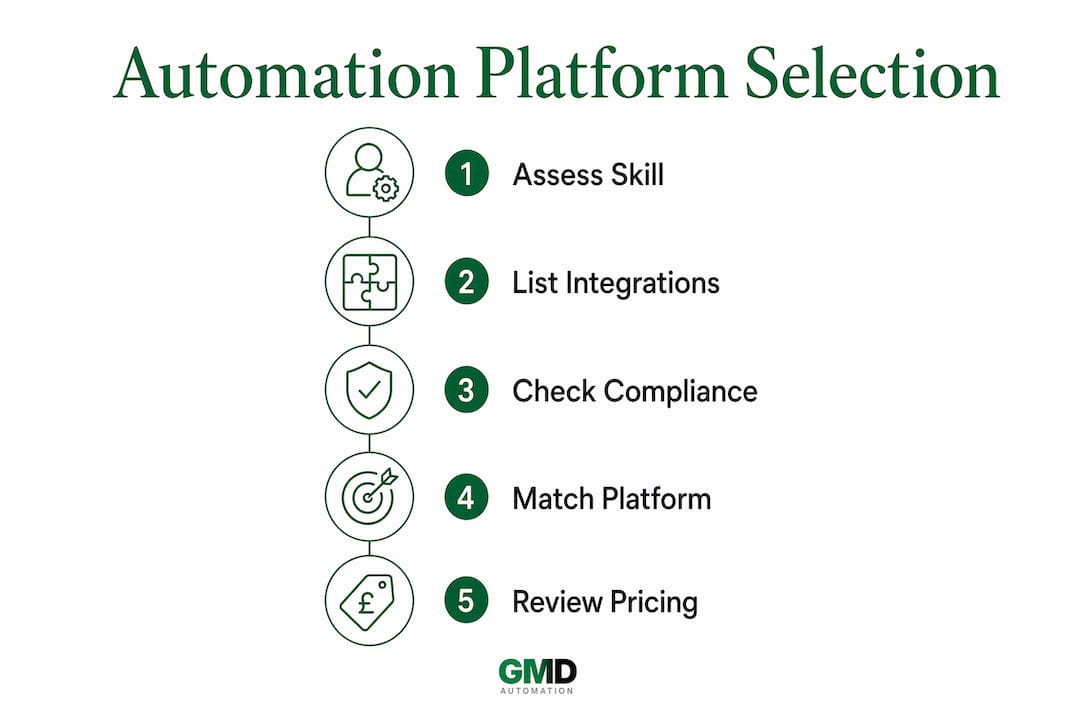
The right preparation prevents wasted spend. Before you evaluate any platform, you need an honest picture of three things: your team's technical ability, your existing software stack, and your data obligations under UK law.
Team technical skill sits at the foundation of every good platform decision. Technical skill level is the most predictive factor in choosing an automation tool, because a lack of expertise leads directly to broken workflows and rising maintenance costs. Non-technical teams succeed with drag-and-drop builders. Developer teams can unlock far greater flexibility with tools that expose API connections and code nodes.

Integration requirements come next. List every application your business relies on, from your CRM and accounting software to your email platform and project management tool. A platform that cannot connect to your existing stack will create more manual work, not less. Check native integrations first, then assess whether the platform supports webhooks or REST APIs for custom connections. For a deeper look at what this involves, the API integration considerations for business systems are worth reviewing before you commit.
Data compliance is non-negotiable for UK businesses. GDPR requires you to know where your data is processed and stored. Self-hosted tools like n8n provide full data sovereignty and complete audit trail control, which matters greatly if you operate in regulated sectors such as finance, healthcare, or legal services. Cloud-based platforms process data on third-party servers, so you must verify their data residency policies and whether they hold UK or EU data centre options.
| Prerequisite | What to assess |
|---|---|
| Team skill level | No-code, low-code, or developer capability |
| Existing software stack | Native integrations and API support |
| Expected automation volume | Monthly task or operation estimates |
| Data compliance | GDPR, data residency, and audit requirements |
| Budget | Monthly subscription cost and projected scaling costs |
How do you select the right automation platform?
Platform categories map directly to team capability and workflow complexity. Choosing the wrong category wastes months of setup time and often results in a tool your team abandons.
No-code platforms suit operations teams and business owners who need automation running quickly without writing a single line of code. These tools use trigger-and-action logic presented through simple menus. They cover the most common business use cases: sending notifications, syncing data between apps, and routing form submissions.
Visual workflow builders offer more power. They present automation as a flowchart, letting you build branching logic, loops, and multi-step processes. These platforms suit teams with some technical confidence but no dedicated developer resource.
Developer-led platforms expose the full capability of APIs and allow custom code at any point in a workflow. They suit businesses with in-house developers who need precise control over data transformation and error handling.
Enterprise-grade platforms add governance features: role-based access, audit logs, single sign-on, and dedicated compliance support. Paid plans for small teams typically start between £20–£50 per month, while enterprise pricing is custom and includes implementation support.
Pricing structure deserves careful scrutiny. Platforms count usage differently. Some bill per task, where each action in a workflow counts as one unit. Others bill per operation or step, which can be significantly more cost-effective for complex, multi-step workflows. Per-step pricing models often favour businesses running workflows with many sequential actions, because a single workflow run costs less than it would under per-task billing. Project your expected monthly volume before committing to any plan.
Cloud-hosted platforms are faster to deploy and require no infrastructure management. Self-hosted options require DevOps capability but eliminate per-execution fees and give you complete control over where data lives. For UK businesses with strict compliance requirements, self-hosting provides complete data sovereignty and removes dependence on a vendor's server locations.
Pro Tip: Start with one core orchestration platform and build all your automations through it. Subscribing to multiple overlapping tools creates automation sprawl, which fragments your data and inflates monthly costs without adding proportional value.
How do you implement automation tools step by step?
A structured implementation prevents the most common failure: building automations that nobody maintains and everyone eventually ignores.
-
Map your workflows first. Write down the recurring tasks that consume the most time. Prioritise processes that are rule-based, repetitive, and triggered by a clear event. Good candidates include invoice generation, lead routing, report delivery, and customer onboarding emails. The process of identifying automation opportunities in your operations is a discipline in itself and worth treating seriously before you open any platform.
-
Create your account and connect your apps. Most platforms guide you through OAuth-based app connections. Connect only the applications relevant to your first workflow. Avoid connecting every app at once; it creates clutter and makes troubleshooting harder.
-
Build your first workflow using the simplest trigger available. Webhook triggers are preferable where possible. Webhook-based triggers cost nothing when inactive, whereas polling triggers consume credits continuously, even when no new data exists. This single choice can meaningfully reduce your monthly usage bill.
-
Test with real data before going live. Run your workflow against actual records, not dummy data. Dummy data hides formatting issues and edge cases that real data exposes immediately. Check every branch of conditional logic separately.
-
Document every workflow you build. Record the trigger, the steps, the apps involved, and the business purpose. Store this documentation somewhere your whole team can access it. Documented workflows and proactive monitoring reduce maintenance overhead and prevent errors when staff change or platforms update.
Pro Tip: Build a naming convention for your workflows before you create more than five. A consistent format like "App: Trigger: Action" makes auditing and troubleshooting far faster when your library grows.
How do you maintain and scale your automation subscriptions?
Automation is not a set-and-forget investment. Platforms update their APIs, apps change their authentication methods, and your business processes evolve. Without regular maintenance, automations break silently and create data gaps you may not notice for weeks.
Schedule a monthly review of your active workflows. Check error logs, confirm that all app connections are still authenticated, and verify that task or operation volumes align with your subscription tier. Evaluating total cost of ownership rather than just the headline monthly fee is the discipline that separates businesses that control their automation spend from those that receive unexpected invoices.
Seasonal businesses benefit from plans that include rollover credits. Unused credits that carry over to the following month allow you to absorb quieter periods without losing paid capacity. Check whether your chosen platform offers this before upgrading tiers.
Automation sprawl is the most common and costly long-term mistake. Businesses subscribing to multiple overlapping tools face higher combined monthly costs and complex data management across disconnected systems. Consolidating onto one primary platform with a clear integration strategy costs less and produces cleaner data.
| Maintenance approach | Cost implication |
|---|---|
| Monthly workflow audit | Prevents surprise tier upgrades from unnoticed volume growth |
| Webhook triggers over polling | Reduces credit consumption on idle workflows |
| Single orchestration platform | Lowers total subscription spend versus multiple tools |
| Rollover credit plans | Smooths costs during seasonal demand fluctuations |
| Self-hosted deployment | Eliminates per-execution fees; requires DevOps resource |
As your team's technical confidence grows, consider whether migration to a more capable platform makes sense. Moving from a no-code tool to a visual builder or developer-led platform unlocks more complex workflows and often reduces per-unit costs at scale. Plan migrations during low-volume periods and run old and new workflows in parallel until you confirm parity.
For teams exploring how AI-powered virtual assistants can complement workflow automation, virtual assistants for IT teams offer a useful perspective on where human-in-the-loop and automated processes intersect.
Key takeaways
Choosing the right subscription-based automation platform requires matching your team's technical skill to the platform's complexity, projecting usage volumes accurately, and maintaining workflows consistently to avoid silent failures and cost overruns.
| Point | Details |
|---|---|
| Match skill to platform | Non-technical teams need no-code tools; developers gain more from API-exposed platforms. |
| Audit pricing models carefully | Per-step billing suits complex workflows better than per-task billing at volume. |
| Prioritise data compliance | UK businesses must verify data residency and GDPR alignment before committing to a cloud platform. |
| Start with one platform | Automation sprawl inflates costs and fragments data; consolidate onto a single orchestration tool. |
| Document and monitor | Documented workflows and regular audits prevent silent failures and reduce maintenance overhead. |
What I have learned from watching UK businesses adopt automation
The businesses that get the most from automation are rarely the ones that move fastest. They are the ones that spend the most time on preparation. I have seen teams sign up for enterprise-tier subscriptions within the first week, only to spend three months building workflows that a basic plan would have handled at a fraction of the cost.
The most common error is skipping the workflow mapping stage entirely. Teams jump straight into the platform, connect a few apps, and build something that works in testing but breaks the moment a real edge case appears. The fix is simple: write down exactly what the workflow does, who triggers it, and what should happen when something goes wrong. That document becomes the foundation for every future change.
Pricing model literacy matters more than most business owners expect. The difference between per-task and per-step billing is not a footnote. At volume, it is the difference between a predictable monthly cost and a bill that doubles without warning. I always recommend projecting three months of expected automation volume before selecting a plan, then choosing the tier above that projection to give yourself room.
My honest recommendation for most UK businesses starting out: pick the simplest platform your most capable team member can maintain confidently, not the most powerful one that looks impressive in a demo. You can always migrate upward. Migrating downward after building complex workflows on an expensive platform is painful and expensive. Build the habit of automation first, then build the complexity.
— Ravi
How Gmdautomation supports UK businesses with subscription automation
UK businesses that want the benefits of AI automation without the complexity of building and maintaining it themselves have a direct route through Gmdautomation.
Gmdautomation delivers enterprise-grade AI automation on a predictable monthly subscription that covers implementation, operation, maintenance, and ongoing improvement. There are no upfront costs and no requirement for internal technical resource. The platform is built for UK compliance requirements, with security and data handling designed for businesses that cannot afford gaps. Whether you are a growing SME or an established organisation, Gmdautomation scales to your needs without requiring you to manage the infrastructure yourself. It is automation done for you, not handed to you to figure out.
FAQ
What are subscription-based automation tools?
Subscription-based automation tools are software platforms that automate recurring business workflows, billed on a monthly or annual basis. They range from no-code tools suited to non-technical teams to developer-led platforms with full API access.
How do I choose the right automation platform for my business?
Match the platform to your team's technical skill level first, then assess integration coverage and pricing model. Technical skill level is the most predictive factor in long-term success with any automation tool.
What is automation sprawl and why does it matter?
Automation sprawl occurs when a business subscribes to multiple overlapping tools without central coordination. It inflates monthly costs and fragments data across disconnected systems, making maintenance harder over time.
How does pricing differ between automation platforms?
Platforms bill on different units: some charge per task, others per operation or step. Per-step pricing is often more cost-effective for complex, multi-step workflows because each workflow run costs less than under per-task billing.
Do UK businesses need to worry about GDPR when using automation tools?
Yes. Cloud-based platforms process data on third-party servers, so you must verify their data residency policies. Self-hosted tools provide full data sovereignty and audit trail control, which is critical for GDPR compliance in regulated sectors.