

Identifying automation opportunities in operations is the process of pinpointing repeatable, accuracy-dependent, and high-impact tasks suitable for automation to reduce costs and improve workflow efficiency. 87% of business executives now expect AI and automation to be the primary drivers for optimising workflows. Yet most UK operations managers skip the structured discovery phase and jump straight to building, which is where costly mistakes begin. Frameworks like the RAPID Framework and audit methods like OpsMap exist precisely to prevent that. The organisations that get automation right start by mapping what they actually do, not what they think they do.
How to identify automation opportunities in operations: the prerequisites
Before you can find automation gaps, you need an accurate picture of your current operations. Most teams underestimate how poorly documented their workflows are. Processes that exist in people's heads, in spreadsheets, or in informal habits are invisible to any automation tool.
The first step is building a current-state process map. This means documenting every step in a workflow as it actually happens, not as the procedure manual describes it. Structured discovery audits typically take 2–4 hours to map core processes. That investment is modest compared to the cost of building automation on a flawed foundation.

A tool audit comes next. List every application your team uses, how data moves between them, and where manual handoffs occur. Manual handoffs are almost always automation candidates. You also need to assess digital readiness: if a process relies on paper forms, verbal instructions, or unstructured data, it cannot be automated until those inputs are digitised.
The table below shows the key tools and frameworks used during the discovery phase:
| Tool or framework | Primary use | Best suited for |
|---|---|---|
| OpsMap audit | Process inventory and dependency mapping | Operations teams starting from scratch |
| RAPID Framework | Scoring individual tasks for automation fit | Prioritising a long list of candidates |
| Automation opportunity scanner | Quantifying ROI and payback period | Finance-led or cost-focused decisions |
| Integration gap inventory | Identifying manual handoffs between systems | IT and operations collaboration |
Pro Tip: Run your tool audit before your process map. Knowing which systems exist often reveals workflows you did not know were happening.
How do you systematically find automation candidates?
The OpsMap audit method breaks discovery into four stages: process inventory, tool audit, priority scoring, and dependency mapping. Each stage builds on the last. Skipping one creates blind spots that cause rework later.
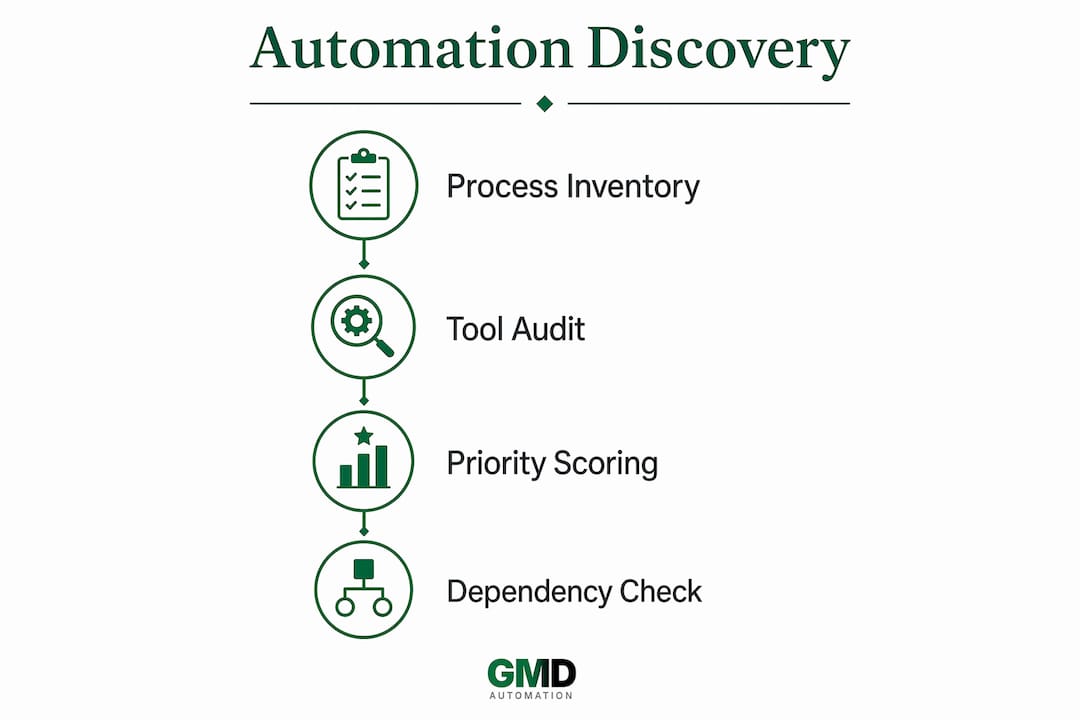
During process inventory, list every recurring task your team performs. Group them by frequency: daily, weekly, monthly. Then classify each task against the RAPID Framework criteria. RAPID scores tasks on five dimensions: Repetitive, Accuracy-dependent, Process-driven, Input-heavy, and Digital-ready. Any task scoring 3 or more out of 5 is a higher-priority candidate for automation.
Here is how to apply the RAPID Framework in practice:
- Repetitive. Does this task happen more than once a week in the same format? Data entry, invoice processing, and status report generation all qualify.
- Accuracy-dependent. Does a human error in this task cause downstream problems? Payroll calculations and compliance checks are classic examples.
- Process-driven. Does the task follow a fixed set of rules with no judgement required? Rule-based approval workflows fit here.
- Input-heavy. Does the task require pulling data from multiple sources and compiling it? Weekly management reports often score high on this criterion.
- Digital-ready. Are all inputs already in a digital format? A task that requires reading handwritten notes scores zero here until digitisation occurs.
After scoring, compile a ranked list of candidates. Order them by total RAPID score, then by frequency. The top of that list is where your automation programme should begin.
Pro Tip: Watch for "shadow steps." These are informal actions team members take to fix errors or fill gaps that never appear in any process document. Audits reveal hidden issues like these that would otherwise cause automation to fail silently.
How to prioritise automation opportunities for maximum ROI
Scoring tasks is not the same as prioritising them. A task can score highly on RAPID but still be the wrong place to start if it has complex dependencies or fragile data. Prioritisation requires a second filter: an impact versus effort matrix.
Plot each candidate on a two-axis grid. The vertical axis measures business impact: time saved, error reduction, cost of manual operation. The horizontal axis measures implementation effort: technical complexity, data quality, number of integrations required. Tasks in the high-impact, low-effort quadrant are your first targets.
The highest ROI automations are predictable, back-office processes such as data syncing, report generation, and invoice matching. These are not exciting. That is precisely why they deliver results. Pursuing complex AI projects before mastering these basics is a common and expensive mistake.
This approach has a name: the "Boring First Method." Automate the dull, high-volume tasks first. They build momentum, demonstrate value to stakeholders, and create a stable foundation for more complex automation later. Distinguishing between automation and augmentation is equally important here. High-frequency, low-value tasks suit full automation. High-value tasks that require judgement benefit more from AI augmentation, where the system supports a human rather than replacing them.
The table below illustrates how to score and compare generic task types:
| Task type | RAPID score | Impact | Effort | Priority |
|---|---|---|---|---|
| Weekly data sync between systems | 5/5 | High | Low | First |
| Invoice processing and matching | 4/5 | High | Low | First |
| Monthly compliance report generation | 4/5 | High | Medium | Second |
| Customer query routing | 3/5 | Medium | Medium | Third |
| Complex contract review | 2/5 | High | High | Last |
Pro Tip: Calculate the cost of manual operation before you build anything. Multiply the time spent per week by the fully loaded hourly cost of the staff involved. That number is your baseline ROI target for any automation you deploy.
What mistakes do operations teams make when finding automation gaps?
The most common mistake is automating a process before verifying how it actually works. A significant disconnect exists between the process managers believe they have and the process their teams actually follow. Automation built on the perceived version fails when it encounters the real one.
A second mistake is ignoring data quality. Automation amplifies whatever is already in your data. If your CRM contains duplicate records or your inventory system has inconsistent product codes, automation will propagate those errors at scale and at speed.
Teams also underestimate integration dependencies. Automating one process often touches three or four systems. Prioritisation must account for integration dependencies to prevent cascading failures when one system changes or goes offline.
Overambition is the silent killer of automation programmes. Operations leaders who pursue complex, strategic tasks in the first wave almost always stall. The teams that succeed start with the boring, predictable work and build credibility before tackling anything sophisticated. Edge case testing before build is not optional. It is the difference between an automation that works on Tuesday and one that works every day.
A final pitfall is insufficient digital readiness. Processes that depend on phone calls, physical documents, or verbal approvals cannot be automated without first redesigning those inputs. Attempting to automate them anyway produces brittle systems that break under normal operating conditions. Checking signs your business needs AI automation before committing to a build saves significant time and budget.
Key takeaways
Structured discovery before build is the single most important factor in successful automation in operations, because it prevents rework, reveals hidden process gaps, and ensures investment goes to the highest-value candidates.
| Point | Details |
|---|---|
| Map actual workflows first | Document how processes really work, not how they are supposed to work, before selecting candidates. |
| Apply the RAPID Framework | Score every candidate on five criteria; tasks scoring 3 or more are priority automation targets. |
| Start with boring, high-volume tasks | Back-office processes like data syncing deliver the fastest ROI and build stakeholder confidence. |
| Use an impact versus effort matrix | Plot candidates by business impact and implementation effort to sequence your automation programme. |
| Audit integration dependencies | Identify which systems each process touches before building to prevent cascading failures. |
Why I think most UK operations teams automate in the wrong order
Operations managers often tell me they want to automate their most complex, visible processes first. I understand the instinct. It feels like that is where the biggest wins are. After years of working with UK businesses on automation discovery, I have found the opposite to be true.
Every hour spent in structured discovery saves approximately three hours in rework during implementation. That ratio holds consistently. The teams that skip the audit phase spend months debugging automations that were built on inaccurate process maps. The teams that invest 2–4 hours upfront in an OpsMap-style audit ship faster and break less.
The other thing I have learned is that automation is a cultural change, not just a technical one. The best AI automation checklist in the world will not save a programme that lacks cross-functional buy-in. Finance, IT, and operations need to agree on what success looks like before the first workflow is built. When they do not, you get competing priorities, scope creep, and stalled projects.
My practical advice for UK operations managers is this: pick three boring, high-frequency tasks from your RAPID assessment. Automate those first. Show the numbers. Then use that credibility to tackle something more ambitious. The business outcomes AI automation delivers compound over time, but only if the foundation is solid.
— Ravi
Gmdautomation: AI automation built for UK operations teams
Gmdautomation works with UK businesses to identify, build, and deploy AI automation without the upfront capital costs that typically slow adoption. Their approach embeds expert consulting directly into the service, so discovery, build, and ongoing optimisation are covered under a single monthly subscription.
For operations managers who want to move from a RAPID assessment to a live automation without managing a complex IT project, Gmdautomation provides the infrastructure and expertise to do it quickly. Their systems are built for UK compliance requirements and integrate with existing operational tools. Visit Gmdautomation to see how their AI automation solutions can accelerate your operations programme from discovery to deployment.
FAQ
What does it mean to identify automation opportunities in operations?
Identifying automation opportunities in operations means systematically finding repeatable, rule-based, and accuracy-dependent tasks that can be handled by software instead of people. The goal is to reduce manual effort, lower error rates, and free staff for higher-value work.
What is the RAPID Framework for automation?
The RAPID Framework scores tasks on five criteria: Repetitive, Accuracy-dependent, Process-driven, Input-heavy, and Digital-ready. Tasks scoring 3 or more out of 5 are considered strong candidates for automation.
Why should I automate boring tasks before complex ones?
Predictable, back-office processes such as data syncing and report generation deliver the fastest and most reliable ROI. Complex tasks carry higher implementation risk and are better tackled once your team has built experience and stakeholder confidence.
How long does an automation discovery audit take?
A structured discovery audit typically takes 2–4 hours to map core processes. That time investment prevents significantly more costly rework during the build phase.
What is the difference between automation and augmentation?
Automation replaces a human task entirely with software. Augmentation uses AI to support a human in completing a task, typically where judgement or context is required. High-frequency, low-value tasks suit automation; high-value, judgement-heavy tasks suit augmentation.