

AI comment moderation classifies incoming comments (toxic, hate, spam, harassment) against confidence thresholds and routes each one to auto-approve, hold-for-review or reject, usually within milliseconds. For production sites, the recommended path is a managed, GDPR-aware pipeline with audit logs and human oversight. Self-hosting suits teams with strict data residency needs or those still experimenting.
The evidence behind that recommendation is straightforward: real-time filtering is technically mature, classification runs across established categories, and regulators increasingly expect human involvement for consequential decisions rather than fully autonomous blocking.
Before you touch a configuration panel, work through this:
- Pick your deployment model: managed SaaS, self-hosted open-source, or a CMS plugin.
- Choose an AI provider or open-source model stack based on your privacy constraints and budget.
- Set confidence thresholds, build a review queue, and turn on logging from day one.
Pro Tip: Don't set your rejection threshold in isolation. Pull twenty recent borderline comments, run them through your chosen model, and eyeball the confidence scores before you commit to a number.
Key Takeaways
Effective AI comment moderation combines fast automated classification with human oversight, documented thresholds and GDPR-compliant data handling to reduce moderation workload without losing accountability.
| Point | Details |
|---|---|
| Choose deployment by risk profile | Managed services suit production scale; self-hosting suits strict data residency or experimentation. |
| Start thresholds conservative | Loosen gradually using labelled false-positive and false-negative data from your own community. |
| Document data flows for GDPR | Record what's sent to models, where it's processed, retention periods and DPA status. |
| Build an audit trail from day one | Log original text, model output, action taken and human overrides for tuning and accountability. |
| Consider Gmdautomation for production rollout | Offers managed, GDPR-aware deployment with onboarding, monitoring and ongoing threshold optimisation included. |
Table of Contents
- How does AI comment moderation actually work?
- What features should you require from a moderation tool?
- Which integration approach fits your platform?
- How does GDPR affect your comment moderation setup?
- How do you tune thresholds without drowning moderators in false positives?
- What does AI moderation cost, and how fast is it?
- Should you self-host or use a managed moderation service?
- Best practices for training and fine-tuning your moderation models
- How do you choose the right approach for your site's size and content?
- How do you monitor and improve moderation after launch?
- What legal considerations apply beyond GDPR?
- How do you handle edge cases and reduce bias?
- Why a managed, GDPR-aware approach makes sense for most teams
- How Gmdautomation supports your comment moderation rollout
- Sources
How does AI comment moderation actually work?
The pipeline runs in five steps: a comment is captured, passed through a lightweight pre-filter (blocklists, regex, rate checks), sent to a model for inference, matched against thresholds to produce a decision, and logged with its reasoning. The whole sequence typically completes before the comment becomes publicly visible.
Three model types dominate:
- Rule-based filters catch known slurs and spam patterns instantly, but miss nuance and context.
- Classical machine learning models (logistic regression, gradient boosting) score faster and cheaper, at some cost to accuracy on subtle abuse.
- Transformer models understand context and sarcasm far better, at a latency and cost premium.
| Model type | Typical latency | Best suited for |
|---|---|---|
| Rule-based | Near-instant | Obvious spam, banned terms |
| Classical ML | Fast | High-volume, budget-conscious sites |
| Transformer | Moderate | Nuanced abuse, sarcasm, multilingual content |
Most sites call the model as a pre-save webhook so a rejected comment never renders. Lower-priority streams (old threads, archived posts) can run through batch audits overnight instead, cutting inference costs without sacrificing coverage.
What features should you require from a moderation tool?
Not every "AI moderation tool" on the market does the same job, and the gaps only show up once you're live. Before signing anything, insist on:
- Multi-label toxicity detection covering hate speech, harassment, spam and sexual content separately, not one blended "bad" score.
- Multilingual support if your community isn't English-only, since most abuse detection models were trained predominantly on English text.
- Confidence scores with adjustable thresholds, so you can tighten or loosen sensitivity per content category.
- Audit logs and review queues that capture the original text, the model's output and any human override.
- CMS and social API integrations plus batch endpoints, so you aren't locked into a single publishing platform.
- Rate-limiting and throughput controls to prevent a comment surge from blowing your inference budget.
- A feedback loop that lets moderators flag false positives back into retraining or prompt refinement.
- Reason fields for every decision, explaining why a comment was flagged rather than a bare pass/fail.
Vendors that can't show you a sample audit log on request usually don't have one worth seeing.
Which integration approach fits your platform?
Three broad patterns cover almost every setup, and the right one depends on your stack, your developer bandwidth and how much control you need over data.
CMS plugins are the fastest route for editorial sites. The AI Comment Guard WordPress plugin supports multiple AI providers including OpenAI, Anthropic and OpenRouter, with configurable thresholds, custom prompts and full logging built in. Drupal sites have an equivalent: a module that calls OpenAI's Moderation API to flag or unpublish comments containing hate speech, violence, sexual content or profanity before they save. The trade-off is flexibility. You're working within whatever the plugin exposes.
API/webhook integration suits custom platforms or unified moderation inboxes spanning several channels. You get full control over routing logic and can plug moderation into an existing pipeline, but you own the latency budget and per-call costs. Guidance on authentication patterns and secure data handling for this approach is worth reading before you build, such as this enterprise API integration guide.
Self-hosted, open-source stacks give you complete data control, which matters if comments contain anything sensitive. The trade-off is ongoing operational overhead: you're patching models, monitoring drift, and running your own infrastructure.
Pro Tip: If you're testing self-hosted options, benchmark on your actual traffic pattern, not a vendor's demo dataset. Toxic comment detection performance shifts noticeably between a tech forum and a parenting community.
How does GDPR affect your comment moderation setup?
Your privacy choices determine whether raw comment text can legally leave your infrastructure and land on a third-party API. Get this wrong and you're not just risking a fine, you're risking your data-processing register looking indefensible in an audit.
Document three things before you go live: what data is sent to the model, where it's processed geographically, and how long it's retained before deletion. If a provider doesn't give you a Data Processing Agreement covering these points, that's a decision, not an oversight.
Practical mitigations worth building in from the start:
- Strip or hash personally identifiable information before it reaches the model where possible.
- Use EU-hosted or on-prem processing if your community data can't leave the region.
- Set retention periods that match your actual moderation needs, not "forever by default."
- Add consent language where comment data feeds into model retraining.
A security architecture guide for AI deployments is a useful reference for mapping these data flows before you commit to a vendor.
Pro Tip: Ask any vendor for their DPA before you ask about pricing. If they hesitate, that tells you more about the product than the feature list does.
How do you tune thresholds without drowning moderators in false positives?
Start conservative. A threshold that's too aggressive on day one buries your review queue and erodes trust in the whole system fast. Loosen it gradually as you gather labelled data on what your model actually gets wrong.
Build triage rules around four outcomes: auto-approve for high-confidence clean comments, auto-reject for high-confidence violations, hold for review in the uncertain middle, and escalate to senior moderators for anything touching legal risk or repeat offenders.
| Confidence range | Typical action |
|---|---|
| Above 90% clean | Auto-approve |
| Above 90% violation | Auto-reject |
| 90% | Hold for human review |
| Repeat offender flagged | Escalate to senior moderator |
Every decision should feed back into the system. Log the comment, the model's output, the action taken and any human override, then use that labelled data to retune thresholds or refine prompts. Skip this step and your moderation accuracy plateaus within weeks.
What does AI moderation cost, and how fast is it?
Latency and cost move together, and the numbers matter for real-time feasibility. CommentGuard reports classification under 50 milliseconds for classical models and around 150 milliseconds for transformer models, both fast enough to gate a comment before it ever displays.
The main cost drivers aren't the model itself. They're call volume, whether you're paying per-inference or a flat subscription, and how much you can shift into batch processing.
| Cost lever | Effect |
|---|---|
| Per-call inference fees | Scales directly with comment volume |
| Batch processing windows | Cuts cost for low-risk, non-urgent content |
| Caching repeated phrases | Reduces redundant model calls |
| Manual review staffing | Rises with false-positive rate, falls as tuning improves |
Some tools offer batch endpoints and rate-limiting specifically to lower cost by processing non-critical content in scheduled runs rather than per-call in real time. Mixing modes, real-time for high-risk posts and batch for the long tail, is usually the cheapest way to stay fast where it counts.
Should you self-host or use a managed moderation service?
For most production sites, a managed service is the better call. You want predictable compliance, ongoing support and someone else carrying the operational burden of model drift and security patching. Self-hosting earns its keep when data residency is non-negotiable or you're still prototyping.
Across the dimensions that matter:
- Privacy: self-hosted wins outright since data never leaves your infrastructure; managed services vary by provider and hosting region.
- Platform coverage: managed services typically cover more CMSs and social channels out of the box.
- Integration complexity: self-hosted stacks like CommentGuard demand continuous maintenance and a feedback loop for model drift; managed services absorb that.
- Pricing: self-hosting trades a subscription for engineering time, which isn't free, just differently billed.
Regulatory frameworks including the EU Digital Security Act push toward human oversight for meaningful moderation decisions, which means the operational question isn't "automate everything" but "automate the obvious cases and route the rest to people, reliably." A managed provider with audit logging and defined escalation paths handles that requirement by design rather than by afterthought.
Gmdautomation's managed AI automation covers exactly this gap: onboarding, GDPR-aware hosting, and ongoing optimisation without your team owning the infrastructure.
Pro Tip: If you're comparing vendors, ask for their procurement checklist responses in writing before signing, not just a sales deck.
Best practices for training and fine-tuning your moderation models
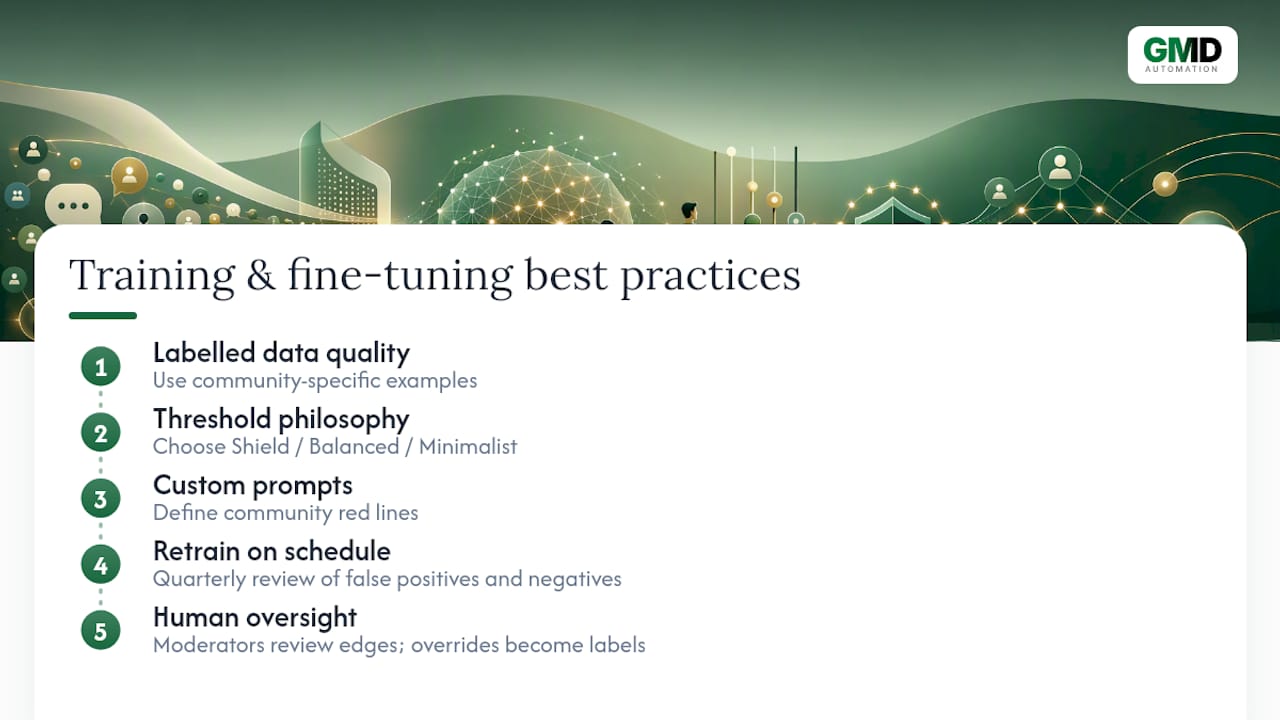
Accuracy improves through iteration, not a one-off setup. The single biggest lever is labelled data quality: feed your model examples specific to your community, not a generic dataset trained on Reddit or Twitter abuse patterns that may not match how your users actually argue.
Threshold selection should map to a deliberate philosophy rather than a guess. Open-source projects like CommentGuard frame this as choosing between a safety-first "Shield" mode, a "Balanced" mode for typical communities, or a high-precision "Minimalist" mode, then tuning thresholds against measured precision and recall curves rather than intuition.
Custom prompts matter more than most teams expect if you're using a large language model for classification rather than a fine-tuned classifier. A prompt that explicitly defines your community's specific red lines (a gaming forum's tolerance for trash talk versus a health forum's) will outperform a generic "detect toxicity" instruction every time.
Retrain on a schedule, not just when something breaks. Model drift happens quietly: slang shifts, new evasion tactics emerge, and a model tuned six months ago starts missing patterns your community has moved on to. Build a quarterly review into your calendar where you pull a sample of recent false positives and false negatives and feed them back into prompt refinement or retraining.
Keep a human moderator involved in reviewing edge cases even after the system is stable. Their overrides are your best source of labelled training data, and they catch context a model structurally can't, like inside jokes that read as hostile out of context.
How do you choose the right approach for your site's size and content?
A five-person hobby blog and a 500,000-comment-a-month news site need fundamentally different setups, and matching the tool to the traffic is where most teams either overspend or under-protect.
For small sites with low comment volume, a CMS plugin is usually enough. The AI Comment Guard plugin or the equivalent Drupal module handle moderate traffic without custom engineering, and per-call API pricing stays cheap at low volume.
Mid-size sites with tens of thousands of monthly comments start feeling the cost and latency trade-offs. This is where mixing real-time inference for high-risk content with batch processing for the rest starts paying off, and where a dedicated API integration beats a plugin's fixed feature set.
Large-scale or high-risk platforms, anything dealing with sensitive topics, minors, or heavy legal exposure, generally need a managed service with documented compliance, dedicated support and SLAs. At that scale, the cost of a moderation failure (a missed harassment campaign, a regulatory complaint) dwarfs the subscription fee.
Content type matters as much as volume. A recipe blog's comment section and a political news site's comment section carry wildly different risk profiles, and your threshold philosophy should reflect that: more permissive for low-stakes content, tighter for anything touching protected characteristics or current events.
How do you monitor and improve moderation after launch?
Deployment is the start, not the finish. Set up dashboards tracking your false-positive rate (legitimate comments blocked) and false-negative rate (violations that slipped through) from week one, using tools like an AI observability setup to catch drift before it becomes a visible problem.
Weekly spot-checks on your review queue tell you more than any dashboard. Pull twenty comments that got held for review and ask whether the threshold that flagged them still makes sense. Patterns emerge fast: a slang term trending in your community, a sarcasm style your model consistently misreads, a spam tactic that's evolved past your filters.
Treat moderator overrides as gold-standard training data. Every time a human reverses an automated decision, that's a labelled example worth feeding back into your threshold tuning or prompt refinement. Skipping this step is the single most common reason moderation accuracy stalls after a strong launch.
Update your models on a cadence, not just reactively. Reviewing how AI systems handle updates without downtime is worth doing before you're forced into an emergency patch during a traffic spike.
What legal considerations apply beyond GDPR?
If your community includes users under 13, COPPA in the United States restricts data collection from children regardless of where your servers sit, which matters if any of your traffic is American even when your business is based elsewhere. That means age-gating and being deliberate about what data a comment moderation system logs and retains for young users.
CCPA gives California residents rights to know what personal data is collected and to request its deletion, rights that overlap heavily with GDPR's but aren't identical in scope or trigger thresholds. If comment metadata (IP addresses, device fingerprints) feeds into your moderation pipeline, it likely counts as personal data under both frameworks.
Beyond data protection law, defamation and liability exposure shift depending on how actively you moderate. Courts in several jurisdictions have drawn distinctions between passive hosts and platforms that exercise editorial control, meaning a heavily moderated comment section can carry different legal exposure than an unmoderated one. This isn't a reason to avoid moderation, but it is a reason to keep clear records of your moderation policy and apply it consistently.
Regulatory direction, including the EU's approach to platform obligations, increasingly expects documented human oversight for consequential moderation decisions rather than silent, fully autonomous blocking. Build your audit trail with that expectation in mind from the start rather than retrofitting it later.
How do you handle edge cases and reduce bias?
No model handles sarcasm, reclaimed slurs, or in-group humour perfectly, and pretending otherwise sets you up for public embarrassment. A term that's clearly hostile in one context is affectionate banter in another, and most classifiers struggle with that distinction because they're trained on surface patterns, not community norms.

Bias creeps in through training data. Models trained predominantly on English-language, Western internet abuse patterns tend to over-flag dialects, non-native phrasing, and cultural references they weren't trained to recognise, which can mean minority voices get disproportionately silenced. Multilingual support helps, but only if the training data for each language reflects genuine regional usage rather than a machine-translated English dataset.
Anti-evasion is the other half of the edge-case problem. Users deliberately misspell slurs, insert characters, or use homoglyphs to dodge filters, and a good moderation system needs anti-evasion detection built in rather than relying on exact-match blocklists.
Mitigate bias with three concrete steps: audit a sample of flagged comments quarterly for patterns in who gets flagged, keep a human reviewer specifically checking for cultural or dialect misfires, and maintain an appeals path so a wrongly blocked comment can be restored without a lengthy fight. No system will get this perfect, but a documented review process turns an occasional bad call into a manageable exception rather than a recurring trust problem.
Why a managed, GDPR-aware approach makes sense for most teams
A managed pipeline reduces operational risk for most organisations because compliance documentation, audit logs and monitoring don't have to be built from scratch by your own engineers. That's a real saving in governance overhead over time, not just convenience.
When evaluating a vendor's SLA, ask specifically for evidence of their data-processing agreement and how they document moderation decisions. If they can't produce a sample audit log unprompted, treat that as a red flag rather than a formality to chase later.
How Gmdautomation supports your comment moderation rollout
Building and maintaining a moderation pipeline in-house means someone on your team owns model drift, threshold tuning and compliance documentation indefinitely. Gmdautomation removes that burden: a fully managed, GDPR-aware deployment with the onboarding, monitoring and ongoing optimisation handled for you, on a predictable monthly subscription with no upfront build cost.
In the first 30 to 90 days, expect integration with your existing platform, threshold tuning based on your actual comment traffic rather than generic defaults, full audit logging from day one, and direct support as edge cases surface. That's the practical difference between a plugin you configure once and a system that keeps working as your community's language evolves.
If you're weighing this against a self-hosted build or a basic plugin, the honest comparison is effort versus control: self-hosting gives you full data ownership at the cost of ongoing engineering time, while a managed pipeline gives you the compliance groundwork and monitoring without needing a dedicated team to maintain it.
Book a demo through Gmdautomation to see how a production-ready moderation deployment would fit your site's traffic and content risk profile.
Sources
- Libraries
- init-krish/commentguard — GitHub
- Comparing powers given to users by the EU Digital Services Act — Stanford Law