

AI in document processing is the application of intelligent algorithms to automatically read, classify, extract, and act on business documents, transforming static files into structured, executable workflows. Technologies including Optical Character Recognition (OCR), machine learning, Natural Language Processing (NLP), and vision models work together to achieve what the industry formally calls Intelligent Document Processing (IDP). Platforms such as Google Document AI, Microsoft IDP, and IBM Document AI now deliver processing time reductions of up to 70% alongside accuracy rates of 98–99%. For UK decision-makers evaluating AI technology in paperwork and workflows, understanding what IDP actually does is the essential first step.
What is AI in document processing, exactly?
AI in document processing, formally known as Intelligent Document Processing, goes far beyond scanning a page. Document intelligence interprets meaning, structure, and context simultaneously, enabling classification, extraction, and interpretation in a single pass. A traditional OCR system reads characters. An AI-native IDP platform understands that a number in the top-right corner of a page is an invoice reference, not a phone number.
The distinction matters enormously for business outcomes. Legacy systems require pre-built templates for every document format. Modern AI platforms handle variable, unstructured documents without manual reconfiguration. That flexibility is what makes IDP applicable across invoices, contracts, insurance claims, and onboarding packs.
Modern Document AI integrates Large Language Models (LLMs) and vision models to process both structured and unstructured documents, automatically extracting data into formats such as JSON for direct ingestion into ERP and CRM systems. The result is a system that does not just digitise documents. It acts on them.

What technologies power intelligent document processing?
Several AI components work together inside a modern IDP platform. Understanding each one helps you assess vendor claims with clarity.
- Optical Character Recognition (OCR): The foundational layer that converts printed or handwritten text into machine-readable characters. OCR alone cannot understand context, but it provides the raw text that higher-level models then interpret.
- Vision AI and layout analysis: Vision-capable language models interpret document layouts and spatial relationships, an evolution beyond text-only OCR. This is critical for tables, multi-column forms, and mixed-format documents such as insurance certificates or supplier invoices.
- Natural Language Processing (NLP) and Large Language Models: NLP extracts meaning from text. LLMs go further, understanding context, resolving ambiguity, and inferring intent. A well-configured LLM can distinguish between a payment term and a penalty clause in a contract without explicit rules.
- Machine learning for continuous improvement: ML models learn from corrections and new document types over time. The more documents a system processes, the more accurate it becomes across varied formats.
- Rule-based versus AI-native platforms: Rule-based systems rely on fixed templates and break when document layouts change. AI-native multimodal platforms reason about document meaning and context, handling variation without manual intervention.
Pro Tip: When evaluating IDP vendors, ask specifically whether their platform uses vision models or text-only OCR. The difference in accuracy on complex, variable-format documents is significant.
True Document Intelligence combines layout, visual, and textual understanding to replicate human document comprehension at machine scale. That combination is what separates a capable IDP platform from a glorified scanner.
How does AI improve document workflow and business outcomes?
The business case for AI in document automation is grounded in measurable operational change. AI-powered document processing reduces processing time by up to 70%, achieves 98–99% accuracy, and lowers administrative costs by 30–40%. Error rates drop by up to 90%, and cycle times compress from weeks to hours. These are not theoretical projections. They reflect production deployments across finance, legal, and insurance sectors.
The cost reduction is particularly relevant for UK businesses managing high document volumes. Reducing manual administrative labour by 30–40% does not simply cut headcount. It redirects skilled staff from data entry to analysis and decision-making, which is where their judgement adds genuine value.
Compliance improvements follow naturally from automated validation. IDP platforms apply consistent rules to every document, every time. Human reviewers, by contrast, introduce variability under pressure or fatigue. Automated validation combined with human-in-the-loop review for low-confidence fields produces a more reliable audit trail than manual processing alone.
Scalability is a further advantage that decision-makers often underestimate. A manual team processing 500 invoices per day cannot easily absorb a sudden surge to 5,000. An AI document workflow scales without proportional cost increases. For businesses in sectors such as financial services, logistics, or professional services, that elasticity is a material operational advantage. You can explore real-world AI automation wins across these sectors to see how this plays out in practice.
What does an AI document processing workflow look like?
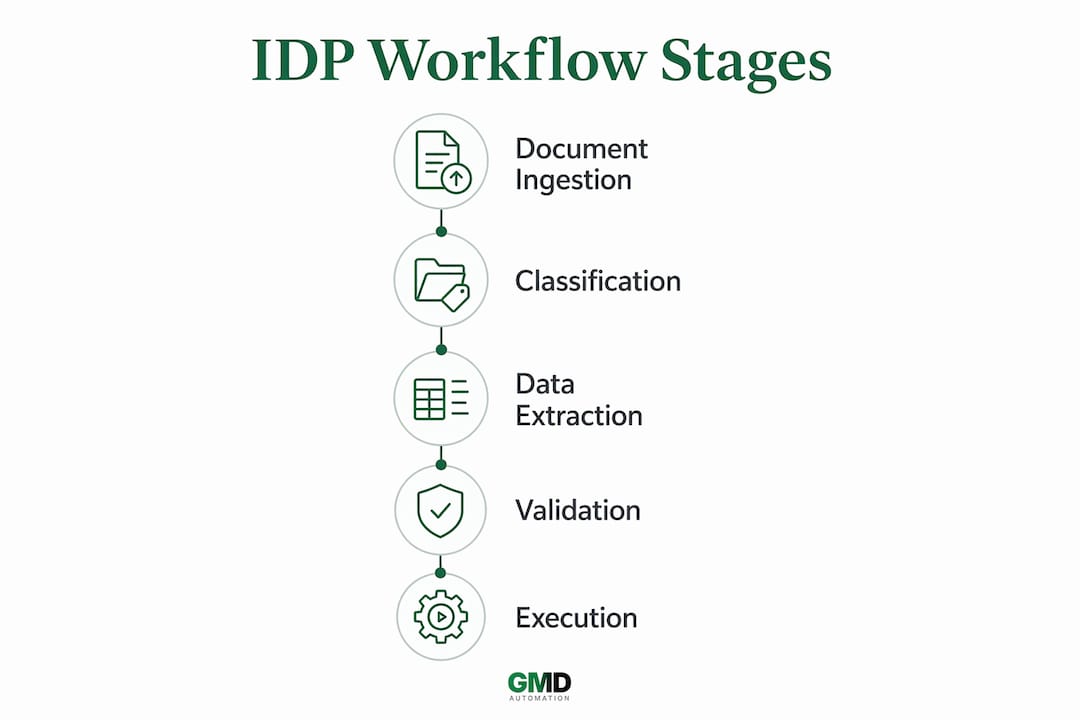
Understanding the step-by-step process helps you assess where AI creates value in your specific operations. A typical IDP workflow follows this sequence:
- Ingestion: Documents arrive via email, API, upload portal, or scanner. The system accepts PDFs, images, Word files, and scanned forms without manual sorting.
- Classification: The AI identifies the document type, whether invoice, contract, claim form, or identity document, using vision and language models rather than file names or folder locations.
- Extraction: Key fields are extracted and mapped to a structured schema. An invoice yields supplier name, invoice number, line items, VAT amount, and payment terms. A contract yields parties, dates, obligations, and termination clauses.
- Validation: Extracted data is checked against business rules, historical records, and external databases. Mismatches or low-confidence fields are flagged for human review rather than passed downstream silently.
- Human review: Human-in-the-loop interfaces display extracted data side-by-side with the original document, allowing reviewers to correct fields efficiently. This step also feeds corrections back into the model for ongoing improvement.
- Integration and action: Validated data flows into ERP, CRM, or approval systems. The document triggers downstream actions automatically, routing an invoice for payment, escalating a contract for legal sign-off, or updating a customer record.
AI document processing delivers most value when integrated into executable workflows that trigger downstream business actions, not just data extraction. That distinction separates a productivity tool from a genuine operational transformation.
Pro Tip: Build confidence thresholds into your IDP configuration from day one. Setting a threshold of 90% confidence before auto-approval, with human review below that level, prevents silent errors from propagating into your ERP.
Successful AI systems treat document workflows as durable, stateful, event-driven executions. This means the system maintains progress across multi-step processes, including human review pauses, without losing context or requiring manual restart. For invoice processing or insurance claims at scale, that resilience is non-negotiable.
How do AI document platforms differ and what should you choose?
The market spans a wide range of capabilities. Choosing the wrong platform creates technical debt that is expensive to unwind.
| Capability | Legacy OCR / Template Tools | AI-Native IDP Platforms |
|---|---|---|
| Document format handling | Fixed templates required | Variable formats handled natively |
| Accuracy on complex layouts | Degrades significantly | Maintained via vision models |
| Context and meaning | Not interpreted | Interpreted via NLP and LLMs |
| Human review interface | Typically absent | Built-in, side-by-side review |
| Workflow orchestration | Manual handoffs | Stateful, event-driven automation |
| ERP/CRM integration | Custom scripting required | API-native with structured output |
Vendors including Google Document AI, Microsoft IDP, IBM Document AI, and Paper AI each offer AI-native capabilities, but they differ in deployment model, integration depth, and support for human-in-the-loop review. Mid-market companies can deploy document automation stacks in weeks when using modern platforms, which removes the traditional barrier of lengthy IT projects.
API-driven document workflows designed with idempotency, asynchronous status polling, and observability are essential for scaling at high volumes. Without these architectural features, integrations become fragile under load. This is a technical requirement worth raising explicitly with any vendor during evaluation.
Organisational memory is a further differentiator. Platforms that track account history, preferences, and past decisions deliver more accurate routing and validation than those treating every document as a fresh input. Context-aware routing reduces bottlenecks in approval chains and cuts error rates in complex multi-party workflows. If you want to understand which industries benefit most from these capabilities, the patterns are consistent across financial services, legal, healthcare, and logistics.
When selecting a platform, prioritise auditability, transparent field-level confidence scores, and a clear human review interface. Avoid platforms that cannot show you why a field was extracted with a given value.
Key takeaways
AI in document processing delivers measurable operational gains only when it combines accurate extraction with stateful workflow orchestration and human review controls.
| Point | Details |
|---|---|
| IDP goes beyond OCR | AI-native platforms interpret meaning and context, not just characters on a page. |
| Measurable efficiency gains | Processing time drops by up to 70% and accuracy reaches 98–99% in production deployments. |
| Workflow integration is critical | Extracted data must trigger downstream actions in ERP and CRM systems to deliver full value. |
| Human review prevents silent errors | Low-confidence fields must be flagged for side-by-side human review before data enters live systems. |
| Platform architecture matters | Choose API-native, stateful platforms with organisational memory over legacy template-based tools. |
The shift i keep seeing organisations miss
Most organisations I speak with frame AI in document processing as a digitisation project. They want to stop printing invoices and start uploading PDFs. That framing leads them to buy OCR tools dressed up with AI branding, and then wonder why the results disappoint.
The real shift is from data extraction to executable workflows. A document is not the end point. It is the trigger. An invoice should not just be read and filed. It should initiate a three-way match against a purchase order, flag a discrepancy, route to the right approver, and update the ERP, all without a human touching a keyboard. That is what modern IDP platforms actually do when configured properly.
The organisations that get the most from AI document automation are the ones that map their existing document workflows before they buy anything. They know which document types cause the most delays, which fields generate the most errors, and which downstream systems need feeding. That clarity makes platform selection straightforward and deployment fast.
I am also cautious about the promise of fully autonomous processing. Human review interfaces are not a sign of weakness in an AI system. They are a sign of maturity. A platform that flags uncertainty and asks for human input is more trustworthy than one that silently passes a wrong value into your accounts payable system. Build your confidence thresholds conservatively at first, then raise them as the model proves itself on your specific document types.
Finally, do not underestimate the value of organisational memory. An AI that knows your top 20 suppliers, their typical invoice formats, and your standard payment terms will outperform a generic model on day one. Feed that context in deliberately.
— Ravi
How Gmdautomation helps UK businesses process documents with AI
Gmdautomation builds AI automation systems specifically for UK businesses, including document processing workflows that connect directly to your existing operations.
Their platform covers the full IDP cycle, from document ingestion and classification through to validated data delivery into your ERP or CRM. Deployment is rapid, with no upfront capital cost and a predictable monthly subscription covering implementation, maintenance, and ongoing optimisation. For UK firms managing high volumes of invoices, contracts, or onboarding documents, that model removes the financial risk from AI adoption entirely. Visit Gmdautomation's AI automation platform to see how their systems are configured for your sector and document types.
FAQ
What is intelligent document processing?
Intelligent Document Processing (IDP) is the formal industry term for AI in document processing. It combines OCR, NLP, machine learning, and vision models to automatically classify, extract, validate, and act on business documents.
How accurate is AI document processing compared to manual data entry?
AI-powered IDP platforms achieve 98–99% accuracy in production environments, reducing errors by up to 90% compared to manual data entry processes.
What types of documents can AI process automatically?
AI document tools handle invoices, contracts, insurance claims, identity documents, purchase orders, and onboarding forms. Modern vision-based platforms process structured, semi-structured, and unstructured formats without fixed templates.
How long does it take to deploy an AI document processing system?
Mid-market businesses can deploy a full document automation stack in weeks using AI-native platforms, compared to months for legacy OCR implementations requiring custom template development.
Do AI document systems require human oversight?
Yes, and they should. Human-in-the-loop review for low-confidence extractions prevents silent data errors and feeds corrections back into the model, improving accuracy over time.