

Ticket triage AI reads, classifies and routes incoming support tickets automatically, so your team only touches the ambiguous or high‑risk ones. It works by scoring category, priority and confidence against your historical data, then sending each ticket to the right queue before a human even opens it.
Adopt it once your volume is high enough that a handful of intents (billing queries, password resets, order status) eat up hours of triage time every week, and SLA breaches keep tracing back to slow routing rather than slow resolution. The first move isn't a full rollout. It's a simulation: run the model against six to twelve weeks of closed tickets and see what it would have done.
Before you commit budget, track three numbers from that simulation:
- Confidence threshold – the score below which a ticket goes to a human rather than an automated queue.
- Reroute rate – how often a human has to move a ticket the AI placed.
- SLA impact – whether time‑to‑first‑reply actually falls, not just whether tickets move faster on paper.
Key Takeaways
Ticket triage AI succeeds when it's scoped to a handful of high‑volume intents, simulated on historical data before going live, and governed with clear confidence thresholds and human override rules.
| Point | Details |
|---|---|
| Simulate before deploying | Test the model against 6–12 weeks of historical tickets before it touches a live queue. |
| Start narrow | Two to five high‑volume intents produce higher confidence and fewer reroutes than broad taxonomies. |
| Priority is easier than category | Priority models often exceed 0.95 F1 quickly; category accuracy depends heavily on data quality. |
| Set acceptance criteria upfront | Agree reroute rate, F1 targets and SLA impact thresholds before the pilot starts, not after. |
| Consider a managed pilot | Gmdautomation runs simulation, integration and governance as one subscription, avoiding an in‑house build. |
Table of Contents
- What is ticket triage AI, and how does it differ from a chatbot?
- What operational benefits does AI triage actually deliver?
- How does AI ticket triage actually work?
- How do you set up a ticket triage pilot?
- How accurate is ticket triage AI, really?
- Which systems does ticket triage AI need to integrate with?
- How do you measure and govern a triage system?
- What do real ticket triage AI deployments look like?
- What I've learned watching these deployments succeed and fail
- Get a managed ticket triage pilot without the build‑it‑yourself risk
- Frequently asked questions
- Sources
What is ticket triage AI, and how does it differ from a chatbot?
Ticket triage AI is not a chatbot. A chatbot talks to the customer; triage AI works behind the scenes, reading a ticket the moment it lands and deciding what it is, how urgent it is, and who should see it next. It never drafts a customer‑facing reply unless you explicitly wire that in later, and most mature deployments keep those two functions separate for good reason.
There are four levels of maturity worth knowing before you pick one:
- Manual triage – an agent or team lead reads every ticket and assigns it by hand.
- Rules‑based routing – deterministic if/then logic (keyword X goes to queue Y) with no learning involved.
- AI‑assisted (human‑in‑loop) – the model suggests category, priority and queue; a human confirms or overrides.
- AI‑first / autonomous – the model routes directly, with humans reviewing only flagged exceptions.
Most teams should start AI‑assisted regardless of eventual ambition. Before automating anything, run a quick checklist: do you have enough ticket volume to justify the setup effort, are your top intents repeatable rather than one‑off, and are any ticket types regulated or safety‑critical enough that they should never touch automated routing? Set firm boundaries early. AI can set category, priority and suggested queue fields. It should not close tickets, issue refunds or send customer replies without a human checkpoint until you've proven reliability over months, not weeks.
What operational benefits does AI triage actually deliver?
The honest answer: routing speed improves almost immediately, resolution time improves later, and customer satisfaction lags behind both. That order matters when you're setting expectations with your leadership team.
Expect these gains, roughly in the sequence they appear:
- Faster time‑to‑first‑reply because tickets stop sitting in a generic queue waiting for a human to categorise them.
- Fewer misroutes, which cuts the back‑and‑forth of a ticket bouncing between teams.
- Lower cost per ticket as agents spend less time on administrative sorting and more on actual resolution.
- Better SLA adherence, particularly for high‑priority tickets that used to get lost in a first‑in‑first‑out queue.
In practice: one open‑source triage deployment reported a 60% reduction in ticket resolution time and a 40% efficiency gain after routing was automated, though these figures come from a single repository's own notes rather than an independent audit, so treat them as a plausible ceiling rather than a guarantee.
Routing accuracy and SLA breach rate move first because they're mechanical. Resolution time and customer satisfaction follow only once agents trust the routing enough to stop double‑checking it.
How does AI ticket triage actually work?
Underneath the marketing language, most systems follow the same four‑stage pipeline, and it's worth knowing each stage because it tells you where things break.
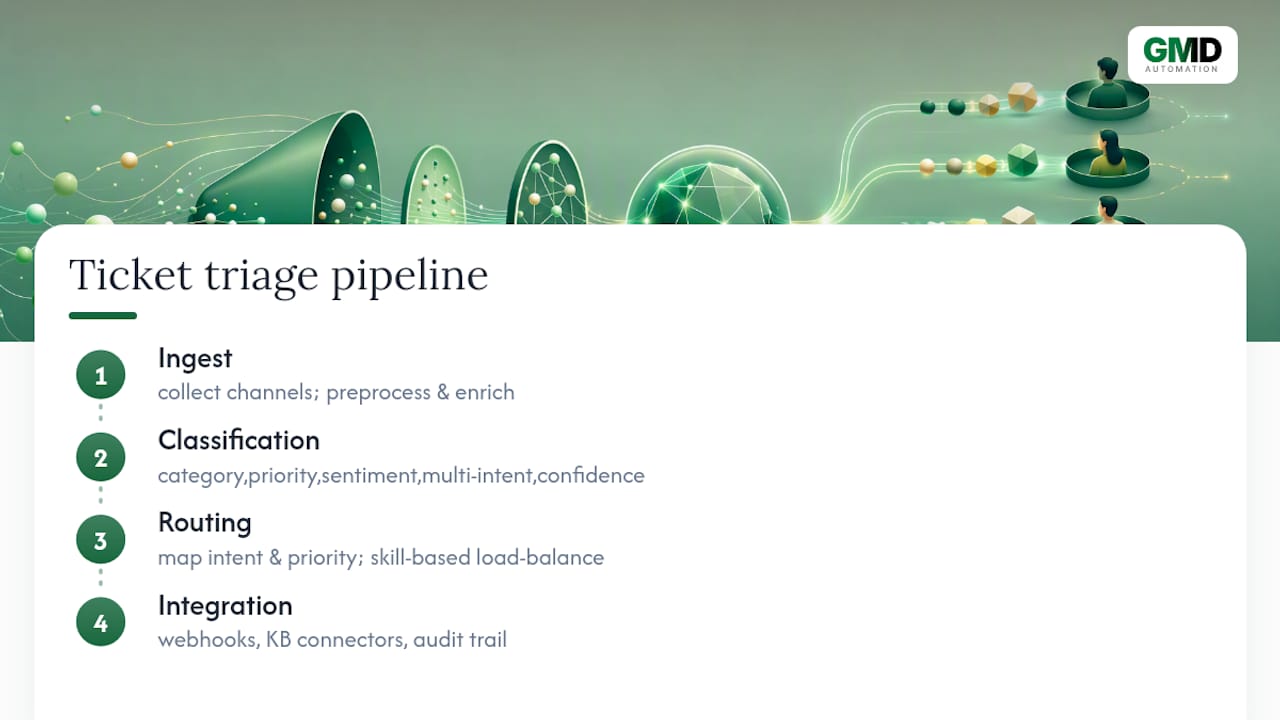
Tickets arrive through an ingest pipeline covering email, web forms, chat and sometimes voice transcripts. Before classification happens, the system pre‑processes the text and enriches it with data from your CRM, billing platform or order system, because raw ticket text alone rarely contains enough signal to route accurately.

The classification layer does the heavy lifting: category prediction, priority scoring, sentiment detection, multi‑intent handling (a ticket can be both a billing question and a complaint), and a confidence score attached to every prediction. One open‑source project, SupportIQ, demonstrates this well: it produces category confidence, sentiment score and priority level as separate outputs, then routes based on priority to senior agents when needed.
The routing layer then maps intent and priority to a specific queue or assignee, often with skill‑based matching and load balancing so one agent doesn't get flooded while another sits idle.

Finally, integration matters as much as the model itself: webhooks push decisions into your ticketing system, knowledge base connectors give the model context on known issues, and an audit trail records every classification so you can review it later.
Pro Tip: Connect your CRM, billing and order history to the triage model, not just the ticket text. A ticket that says "it's broken again" means something completely different for a customer on their first week versus one with six prior escalations, and the model needs that context to score priority correctly.
How do you set up a ticket triage pilot?
Skipping straight to production is the single most common way pilots fail. Simulation first, production second, always in that order.
Pre‑pilot preparation:
- Pick one or two channels (email is usually simplest) rather than trying to triage everything at once.
- Pull six to twelve weeks of historical tickets, including their eventual category, priority and resolution outcome.
- Define the smallest useful intent set. Two to five high‑volume intents beat twenty fuzzy ones, because fewer categories increase model confidence and cut reroute rates.
Simulation: run the trained model against those historical tickets without touching a live queue. Measure confidence distribution, how often it would have rerouted a ticket, and how many false positives show up in high‑priority predictions. This step alone, done properly, catches most of the embarrassing mistakes before a customer ever sees them, and practitioner guidance consistently backs simulation before production as the difference between a pilot that scales and one that gets quietly switched off.
Phased rollout, roughly two to three weeks per phase:
- Phase 1: internal‑note mode. The AI suggests category and priority as an internal note; agents still make the call. No customer‑facing risk at all.
- Phase 2: soft routing. The AI routes tickets automatically, but agents can reassign with one click, and you track how often they do.
- Phase 3: auto‑action. Only for the highest‑confidence intents, once phases 1 and 2 have proven stable for several weeks.
Set acceptance criteria before you start, not after you see the numbers. A reasonable pilot target is priority classification F1 above 0.90 (achievable relatively quickly, per comparative research on ticket classification models), category F1 appropriate to your intent count, reroute rate under 15%, and a measurable drop in SLA breaches within the pilot window.
Budget for more than the software licence: compute or API costs, integration engineering time, and, often underestimated, the change‑management effort of getting agents to trust a system that used to be entirely their judgement call.
How accurate is ticket triage AI, really?
Priority classification is the easy win. Comparative research across public and enterprise ticket datasets found priority models reaching accuracy and F1 scores above 0.95 fairly consistently, because priority draws on predictable signals like SLA risk, account tier and urgency language. Category classification is harder, and enterprise‑specific terminology tends to drag accuracy down unless the model has been fine‑tuned or given retrieval access to your own documentation.
The same research found something worth remembering before you over‑invest in infrastructure: classical machine‑learning algorithms, including Logistic Regression, SVM and XGBoost, often matched or beat deep learning models on these classification tasks. You don't necessarily need a large language model to get solid category and priority predictions; you need good data.
That's the real failure mode. Stale knowledge bases, missing system‑of‑record context, low‑volume intents that the model has barely seen, multilingual ticket streams and safety‑critical routing decisions all erode accuracy faster than model choice ever will. Operational experience suggests accuracy depends far more on data quality than on model size, and enterprise vocabulary specifically needs context‑aware fine‑tuning or retrieval‑augmented generation to avoid drifting into the wrong category.
Pro Tip: Set a confidence threshold and mean it. Anything below that line goes to a human, full stop. Then sample your reroutes weekly, flag recurring errors as knowledge base or taxonomy fixes, and resist the urge to retrain the whole model every time something goes wrong.
Which systems does ticket triage AI need to integrate with?
Integration determines whether triage AI actually works or just produces confident‑sounding guesses in isolation.
The obvious targets are your ticketing platforms: Zendesk, Freshdesk, HubSpot or Autotask if you're running an MSP. Each needs to expose account tier, SLA targets, past ticket history and custom fields, plus a webhook endpoint so classification decisions land in the right place automatically. Zendesk's own documentation on intelligent triage outlines exactly this kind of configuration for safe, guarded routing inside an existing helpdesk.
Beyond the ticketing system, connect CRM and billing data so the model knows who it's dealing with, and a knowledge base connector so it can check whether an issue is already documented. A working example of this pattern is a Flask‑based classifier that integrates directly with Zendesk, offering batch and single‑ticket endpoints and mapping predicted categories straight to Zendesk tags.
Deployment options range from fully cloud‑hosted to private VPC or on‑premises connectors for sensitive data, with hybrid setups common where some ticket types (financial, healthcare) need stricter isolation than others. If voice is part of your channel mix, transcript quality and call metadata matter as much as the classification model itself, since a poor transcript feeds the model garbage before it even starts.
How do you measure and govern a triage system?
Track precision, recall and F1 separately for category and priority, because they behave differently, plus confidence distribution, reroute rate, the change in SLA breaches, and how often a customer has to re‑contact support after a ticket was supposedly resolved.
Your testing checklist should include simulation against historical tickets, an A/B test comparing AI‑routed against manually routed queues, a shadow mode period where the AI runs alongside humans without acting, and only then a progressive lowering of the confidence threshold as trust builds.
Governance needs to cover an audit trail for every routing decision, automatic tagging of low‑confidence tickets for human review, clear escalation rules, and an override workflow that any agent can trigger without friction.
| Metric | Why it matters | Suggested pilot target |
|---|---|---|
| Priority F1 | Confirms urgent tickets reach the right queue fast | Above 0.90 |
| Category F1 | Reflects how well the model understands your specific product/service language | Set per your intent count; tighter scopes score higher |
| Reroute rate | Shows how often humans have to correct the AI | Under 15% |
| SLA breach delta | The real business metric leadership cares about | Measurable reduction within the pilot window |
| Re‑contact rate | Flags tickets marked resolved that weren't | Should not rise versus your pre‑AI baseline |
- Build the dashboard before the pilot starts, not after.
- Review flagged low‑confidence tickets weekly, not monthly.
- Revisit thresholds every phase, not just once at launch.
What do real ticket triage AI deployments look like?
A SaaS support queue scoped its pilot to three intents (billing, login issues, feature requests), ran internal‑note mode for three weeks, then moved to soft routing.
An MSP operations team used priority scoring tied to contract SLA tier and reported a resolution time drop consistent with the kind of gains seen in open‑source triage tooling notes, though they treated that repository's 60% figure as an upper bound to aim towards rather than a guarantee.
An e‑commerce billing queue combined a classifier with system‑of‑record order data, cutting misroutes on refund‑adjacent tickets by keeping the highest‑risk category (chargebacks) in human‑only review throughout.
What I've learned watching these deployments succeed and fail
Scope discipline is the single biggest predictor of whether a pilot survives past month three. Teams that try to triage every intent from day one drown in edge cases and lose confidence in the whole project. Teams that pick three intents, prove it works, then expand, build something that lasts.
The second lesson is about restraint, not capability. The AI's job is to operate the queue, not to make judgement calls that used to belong to a person. Every deployment I've seen struggle has tried to skip the internal‑note phase because it "felt slow." It isn't slow. It's the only phase where you find out what the model gets wrong before a customer notices.
On the build‑versus‑buy question: building in‑house makes sense if you have dedicated ML engineering capacity and time to spare. Most support operations teams don't, which is exactly the gap a managed automation checklist is designed to close.
Get a managed ticket triage pilot without the build‑it‑yourself risk
Gmdautomation runs the simulation, integration and governance work this article just walked through, so you get a working pilot without hiring an ML engineer or gambling six months on an in‑house build. That means no upfront licence fee to gamble on unproven accuracy: implementation, integration with your existing ticketing platform, and ongoing monitoring all sit inside one predictable monthly subscription.
The same phased approach applies: simulation against your historical tickets first, internal‑note mode second, soft routing third, with acceptance criteria agreed before anything touches a live queue. If you're weighing this against building your own classifier from open‑source components, the honest trade‑off is time and risk. A managed pilot gets you a working, monitored system in weeks rather than a research project with no fixed end date. Book a demo of GMD Automation's AI deployment systems to see how a pilot would map onto your own ticket volume and existing helpdesk setup.
Frequently asked questions
What is ticket triage AI in simple terms? It's software that reads an incoming support ticket, works out what it's about, how urgent it is, and which team should handle it, all before a human opens it.
What are the main types of ticket triage? Manual (a person sorts every ticket), rules‑based (fixed if/then logic), AI‑assisted (the model suggests, a human confirms), and AI‑first (the model routes directly with exceptions flagged for review).
How is AI ticket routing different from a rules engine? A rules engine only follows fixed keyword logic you wrote in advance. AI routing learns patterns from historical tickets and can handle wording it hasn't seen before, though it needs ongoing monitoring that rules engines don't.
Can ticket triage AI work for NHS or healthcare support desks? It can, but any healthcare‑adjacent deployment needs stricter human‑in‑loop review and data handling controls than a typical commercial support queue, particularly for anything touching patient information.
How long does a ticket triage AI pilot typically take? A phased pilot, from simulation through internal‑note mode to soft routing, usually runs six to nine weeks depending on ticket volume and how many intents you're scoping.
Does ticket triage AI replace support agents? No. It removes the manual sorting step so agents spend their time resolving tickets rather than categorising them, with humans still handling ambiguous or high‑risk cases throughout.
Sources
- Comparative Study of Machine Learning and Deep Learning Algorithms for Customer Support Ticket Classification: Evidence From Public and Enterprise Datasets
- About intelligent triage
- AI Agent for Zendesk Ticket Triage: 2026 Setup Guide