

AI genuinely reduces the admin load in property management, but only when it targets narrow, repetitive jobs: sorting tenant messages, triaging maintenance requests, chasing rent, and pulling data off leases. It works best as an assistant that spots patterns and clears the routine backlog, not as a replacement for judgement calls. Every pilot needs a human checking the output before it scales.
TL;DR:
- Automate high-volume tasks like rent reminders, maintenance triage, and tenant FAQs first, ensuring error rates are monitored during pilot testing.
- Integrate AI through API-based connections to existing property management systems, with proper security, schema mapping, and phased rollout.
- Data quality issues such as duplicates or inconsistent formats are the main cause of AI failure; a thorough early audit is essential.
- Train staff on AI decision-making boundaries and establish clear override procedures with designated roles like an internal AI owner.
- Outsourcing deployment to managed providers offers a lower-risk, compliance-focused option that eliminates in-house integration and ongoing maintenance burdens.
Table of Contents
- How AI capabilities translate into property management tasks
- Which use cases to automate first
- How to choose and implement AI: vendor and integration checklist
- Integration, data flows and governance in practice
- What not to automate, and how to monitor what you do
- Getting started: a 30/90/180 day pilot plan
- Why data quality decides whether AI actually works
- Training staff to work alongside AI, not around it
- A managed approach beats a tool-shopping approach
- Get a managed AI pilot running without the upfront cost
- Sources
How AI capabilities translate into property management tasks
Three technologies do almost all the heavy lifting. Natural language processing (NLP) reads and categorises free text, so it can sort a tenant's email into "urgent leak" or "general query" without a person opening it first. Optical character recognition (OCR) turns scanned lease PDFs into structured data, pulling out renewal dates and deposit amounts automatically. Predictive models spot patterns in maintenance history, flagging which boiler is statistically likely to fail before it does.
Each capability maps onto a specific job:
- OCR plus rule sets → automatic lease expiry and certificate renewal reminders
- NLP plus triage rules → maintenance requests routed to the right contractor without a dispatcher reading every ticket
- Predictive analytics → preventative maintenance scheduled ahead of breakdowns, not after
- Voice agents → after-hours call handling and appointment booking without a night shift
Industry analysis puts the scale of this in context: roughly 37% of real estate tasks are automatable, a figure that translates into serious hours back for teams currently doing this manually.
Which use cases to automate first
Not every task deserves the same priority. Start where the volume is highest and the judgement required is lowest.
- Rent collection and reminders. Automated reminders fire before the due date, payment confirmations reconcile against the ledger automatically, and arrears trigger an escalation sequence rather than a manual phone call.
- Maintenance triage and scheduling. Incoming requests get categorised by urgency and trade, routed to an available contractor, and logged with a timestamp for accountability.
- Tenant communications and FAQs. A voice or chat agent answers "when's my rent due" and "how do I report a repair" instantly, cutting the routine call volume a human team fields every day.
- Lease and contract data extraction. OCR pulls key dates and clauses from signed leases into the property management system (PMS) automatically, so nothing expires unnoticed.
- Applicant screening assistance. AI pre-checks references and flags inconsistencies for a human to review, rather than deciding on its own.
Pro Tip: Pick one use case, run it against a fixed sample of 50 to 100 tickets or leases, and measure error rate before expanding. A pilot that skips this step almost always overpromises.
How to choose and implement AI: vendor and integration checklist
The vendor choice matters less than the integration plan behind it. Before signing anything, confirm the system talks to what you already run.
Selection checklist:
- Compatibility with your existing PMS and accounting ledger
- A documented API, not just CSV exports
- Clear data residency and security commitments
- Onboarding support included, not billed as an extra
- A service level agreement (SLA) with defined response times
- Transparent pricing with a genuine trial or pilot period
Questions worth asking vendors and internal stakeholders:
- How does the system handle a mid-pilot data error?
- Who owns data once the contract ends?
- What does IT need to whitelist or configure before go-live?
- Does compliance need to review the data flow before rollout?
- What's the realistic timeline from contract to first automation live?
Roll out in phases: pilot one or two automations, measure against fixed metrics, then scale. Track time saved per task, response time to tenants, and error rate against a human baseline before touching a third automation. Savills recommends automating the repetitive admin first and keeping people in the loop for anything requiring judgement, which is the right order of operations for almost every portfolio.
Integration, data flows and governance in practice
Most successful deployments layer AI on top of the existing PMS rather than replacing it. The recommended pattern is an API-based sync or scheduled data pull, with webhooks pushing updates back into the ledger in near real time. CSV imports work for a one-off migration but break down as a permanent integration method; schema mapping and a proper test environment are the two tasks teams underestimate most often.
Data protection needs to be specific, not aspirational:
- Encryption at rest and in transit for tenant and financial data
- Least-privilege access so only relevant staff see personal data
- Logging of every automated decision for audit purposes
- A written retention policy stating how long data is kept and why
A managed deployment model removes the biggest barrier for small teams: the integration and compliance work that a lean operation rarely has spare capacity to handle in-house.
GMD Automation runs this exact model: predictable subscription pricing covers deployment, operation, and ongoing optimisation, with security and compliance handled as part of the service rather than left to the client's IT team.
What not to automate, and how to monitor what you do
Some tasks stay firmly human. Complex lease negotiations, legal judgement calls, and sensitive tenant disputes all involve context and discretion that current AI systems handle poorly, and getting one wrong carries real legal or reputational cost.
For everything you do automate, build a monitoring layer from day one:
- Sample audits on a fixed percentage of AI decisions each week
- Defined KPIs: error rate, response time, escalation frequency
- A clear threshold at which a case gets kicked to a human
- Written escalation procedures so staff know exactly when to intervene
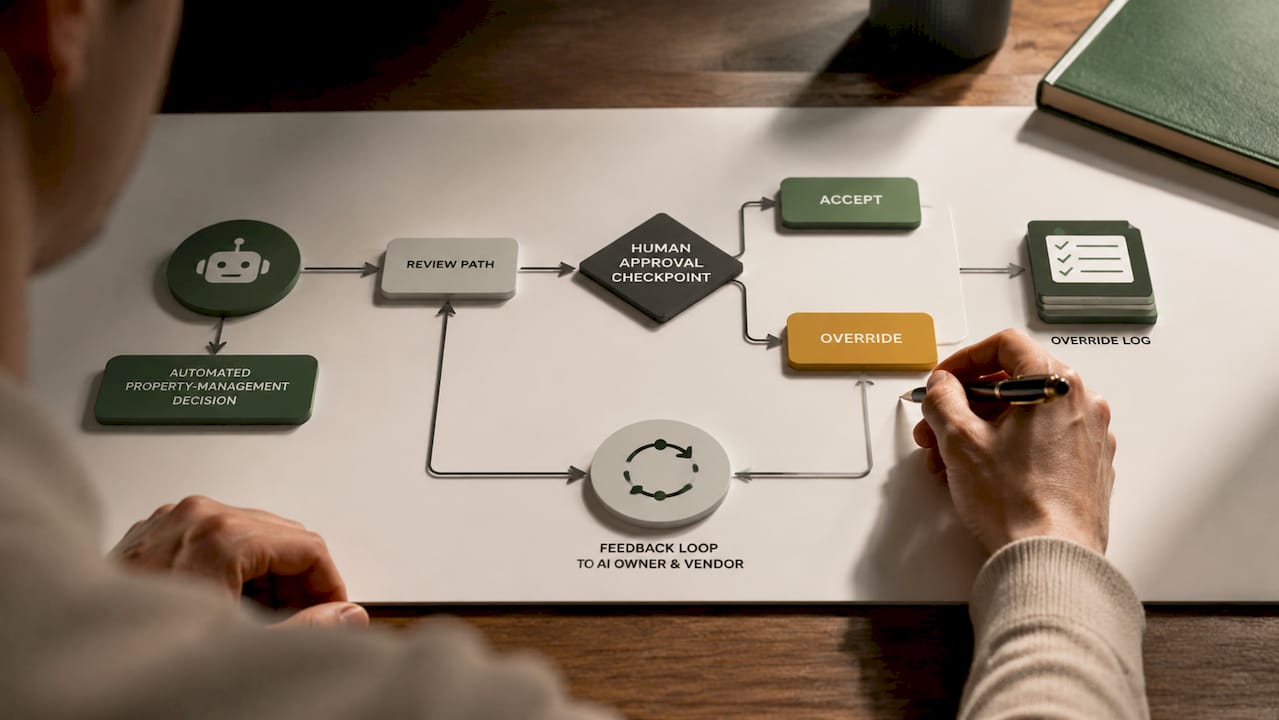
Pro Tip: Keep a visible log of every AI override for the first 90 days. It tells you faster than any dashboard whether the rule set needs adjusting.
Staged rollouts and access controls limit the damage to a bad automation before it reaches every tenant. Standard operating procedures (SOPs) for manual overrides matter as much as the automation itself.
Getting started: a 30/90/180 day pilot plan
- Days 1 to 30: Pick one use case, confirm the data sources are clean, get sign-off from ownership and IT, and run a small pilot against a fixed sample.
- Days 30 to 90: Review the pilot's error rate and time saved, expand to a second automation, and train staff on override procedures.
- Days 90 to 180: Scale the automations that worked, fold reporting into existing management meetings, and set a quarterly optimisation review.
| Phase | Focus | Success metric |
|---|---|---|
| 30 days | Single pilot use case | Error rate below human baseline |
| 90 days | Expand and train staff | Time saved per task, tenant response time |
| 180 days | Scale and embed reporting | Sustained reduction in manual tickets |
Why data quality decides whether AI actually works
Most AI failures in property management trace back to messy source data, not a weak model. A lease scanned at an angle, a maintenance log with inconsistent categories, or tenant records split across three spreadsheets will produce unreliable output no matter how good the underlying system is.
Three problems show up repeatedly. Duplicate tenant records across systems confuse triage rules, so the same request gets logged twice under different names. Inconsistent formatting in historic maintenance logs (free text versus structured fields) makes predictive maintenance models far less accurate than vendors promise in a sales demo. And missing or outdated lease data means expiry reminders fire late, or not at all, undermining the exact workflow they were meant to fix.
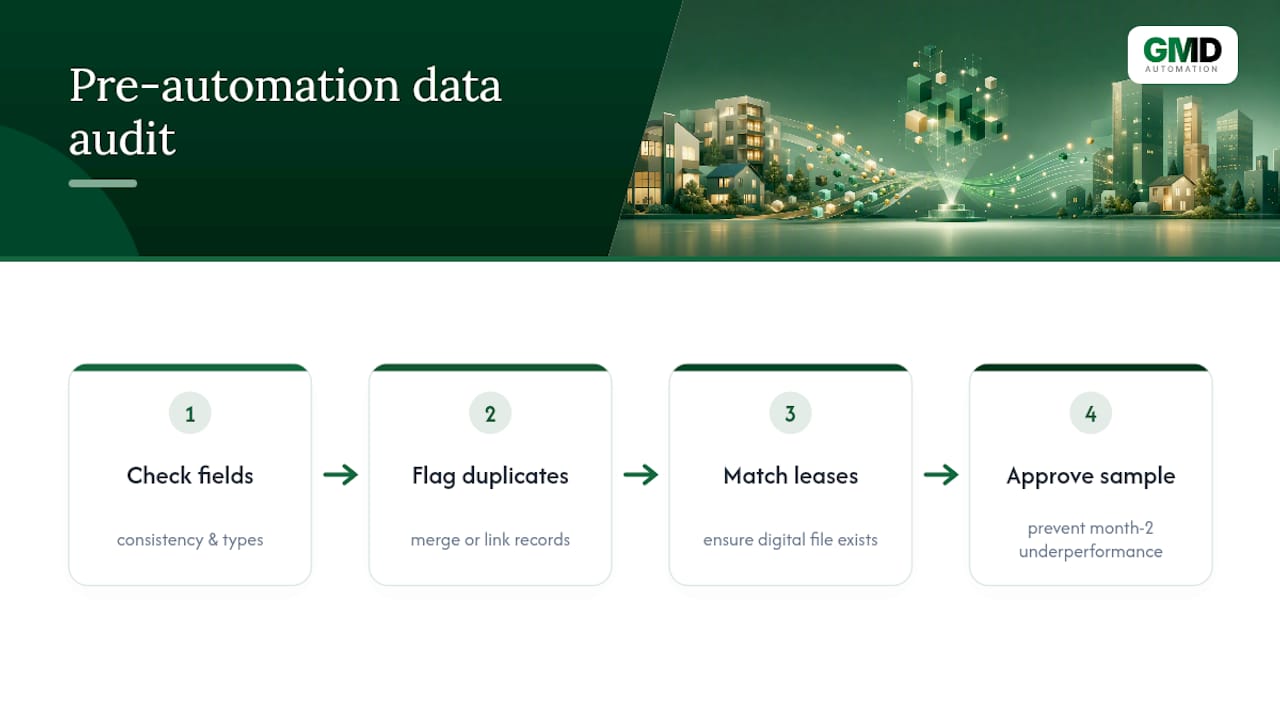
Fixing this before automation starts matters more than choosing the right vendor. A basic data audit, run over the first two to three weeks, should check field consistency, flag duplicate records, and confirm every active lease has a matching digital file. Skipping that step is the single most common reason a pilot underperforms in month two, after looking strong in week one on a small clean sample.
Training staff to work alongside AI, not around it
Staff resistance rarely comes from the technology itself. It comes from uncertainty about what the AI is deciding versus what a human still owns. Clear that up early and adoption goes far more smoothly.
A short training programme should cover three things: what the automation does and doesn't decide, how to read the audit log, and exactly when to override a flagged decision. This does not need a formal certification. A one-hour session plus a written one-page reference sheet covers most staff needs, provided it's revisited after the first month once real edge cases have surfaced.
Property managers who've run this well tend to appoint one internal "AI owner" per team, someone who fields questions, watches the override log, and feeds patterns back to the vendor or managed provider. Without that role, small issues pile up silently until someone notices a spike in tenant complaints. Staff who understand the override process are also far more likely to trust the system with genuinely repetitive work, freeing them for the judgement-heavy tasks that still need a person.
A managed approach beats a tool-shopping approach
Most teams treat AI adoption as a shopping exercise: which platform has the best features. That's the wrong question. The pilots that actually deliver treat AI as a digital worker with an explicit playbook, not a model you trial and hope performs.
Onboarding quality matters more than model choice almost every time. A mediocre model with clean data, clear rules, and proper escalation paths outperforms a sophisticated one dropped into a messy PMS with no SOPs. That's the pattern behind most successful automation projects worth studying, and it's why the integration work always deserves more attention than the vendor comparison spreadsheet.
— Ravi
Get a managed AI pilot running without the upfront cost
Building this in-house means hiring for integration work, compliance review, and ongoing model maintenance, three separate skill sets most property teams don't have spare. Gmdautomation runs the whole deployment as one monthly subscription: no upfront capital spend, and the fee covers implementation, operation, and ongoing optimisation rather than a one-off project fee that leaves you maintaining the system yourself.
That matters most for teams juggling maintenance triage, rent reconciliation, and tenant calls with limited headcount. Gmdautomation handles the API integration into your existing PMS, sets up the governance and audit logging covered above, and adjusts the automation as your portfolio changes, rather than leaving you to manage a static tool. For voice-based call handling specifically, a dedicated service like property management call answering covers the same ground from the telephony side. Request a demo through Gmdautomation to see how a pilot maps onto your own PMS and rent roll before committing to anything.
Sources
- AI in Real Estate: Innovations Reshaping the Real Estate Sector | Morgan Stanley
- Using AI and tech to improve efficiency in Property Management | Savills