

Vector databases now underpin retrieval-augmented generation, semantic and hybrid search, recommendation engines, multimodal search, fraud detection, and long-term memory for AI agents. Choose a dedicated vector database once you need low-latency search across millions of embeddings with metadata filters and production-grade uptime; below that threshold, a vector extension on your existing database, or a managed route like Gmdautomation, often does the job with far less operational overhead.
TL;DR:
- Dedicated vector databases are necessary for high-volume, low-latency search across tens of millions of embeddings with complex filtering, especially if uptime and replication are critical.
- For datasets under a few million vectors or in early prototyping stages, adding a vector extension to existing SQL databases like PostgreSQL or MySQL offers a simpler, low-overhead solution.
- Choosing the right index type depends on workload: HNSW is best for read-heavy, static data, while IVF and PQ are more suitable for write-heavy, large-scale datasets.
- Production systems should track retrieval accuracy, latency, cache hit rates, and embedding drift to ensure reliable performance and cost efficiency.
- Managed vector search solutions provide a low-cost, scalable alternative to self-built infrastructure, especially for teams facing high query volumes and operational complexity.
Table of Contents
- How vector databases work: embeddings, similarity search and index types
- Core production use cases with practical examples
- When to choose a dedicated vector database versus extensions or hybrid approaches
- Architecture and implementation considerations for production systems
- Integration patterns for RAG, support bots and recommender pipelines
- Risks, trade-offs and best practices for production reliability
- Evidence of production adoption and a managed alternative
- Where I'd start if I were prioritising this
- A managed route into vector search without the infrastructure build
- Sources
- FAQ
How vector databases work: embeddings, similarity search and index types
An embedding is a numerical fingerprint of meaning. A sentence, an image, or a snippet of audio gets converted by a model, such as an OpenAI, Cohere, or open-source Sentence-Transformers model, into a list of numbers (a vector) where things that mean similar things sit closer together in that numerical space. Two support tickets about "can't log in" and "password reset failing" end up near each other even though they share almost no words. That's the entire trick behind semantic search: distance in vector space stands in for similarity in meaning.

Finding the nearest points to a query vector is called similarity search, and it usually runs on one of three measures: cosine similarity (angle between vectors, ignoring magnitude), Euclidean distance (straight-line distance), or inner product (favoured when magnitude carries signal, as in some recommendation models). None is universally "correct" — the choice depends on how the embedding model was trained.
Searching every vector in a dataset one by one (exact nearest neighbour) becomes impossibly slow past a few hundred thousand records, so production systems use approximate nearest neighbour (ANN) indexes instead. The main families:
- HNSW (Hierarchical Navigable Small World): a graph-based index that gives excellent recall and speed, the default choice for most read-heavy workloads.
- IVF (Inverted File Index): clusters vectors first, then searches only the relevant clusters, trading some accuracy for lower memory use at scale.
- Product Quantisation (PQ): compresses vectors to shrink memory footprint, often paired with IVF for datasets running into the billions.
- Tree-based indexes: less common now, but still used in some libraries for lower-dimensional data.
Dimensionality matters more than most teams expect. A 1536-dimension embedding (typical of larger commercial models) costs roughly four times the storage and compute of a 384-dimension one, and that cost compounds across sharding and replication. The VectorDB survey published in VLDB catalogues exactly this tension: ambiguous search criteria, expensive vector comparisons at scale, and the difficulty of combining structured filters with unstructured similarity all shape which index and storage layout will actually hold up in production.
Core production use cases with practical examples
Vector search stopped being a research curiosity once teams realised it solves problems keyword search structurally cannot. Here are the use cases doing real work in production today.
- Retrieval-augmented generation (RAG). An LLM alone will confidently invent facts. RAG fixes that by embedding a user's query, retrieving the most relevant chunks from a vector index, and feeding those chunks to the model as grounding context before it generates an answer. The pipeline is embed, retrieve, rerank, then generate, and that reranking step is not optional. Retrieval quality, not model size, is usually the actual bottleneck in production RAG systems, according to engineering write-ups from Glean — a mediocre retriever feeding a brilliant model still produces mediocre answers.
- Semantic and hybrid search. Pure vector search finds meaning; pure keyword search finds exact terms and respects strict filters (price ranges, dates, category codes). Hybrid search runs both and blends the results, which is why most serious enterprise search deployments use it rather than choosing one or the other.
- Recommendation systems. Product, content, and media recommendations increasingly run on embedding similarity rather than collaborative filtering alone. Delivery Hero built a realtime item-replacement tool using vector search on MongoDB Atlas, returning suitable substitute products within a strict low-latency budget when an ordered item is out of stock.
- Multimodal search. Aligning image, text, and audio embeddings into a shared vector space lets a user search a product catalogue with a photo, or search a video library with a text description. The UI challenge is often harder than the retrieval challenge: users need visual feedback that the system understood the query, not just a results list.
- AI agent memory. Agents that carry context across a long session, or across multiple sessions, typically store conversation history and learned facts as vectors, then retrieve relevant memories rather than replaying an entire transcript. Microsoft's semantic kernel documentation describes exactly this pattern for persisting agent memory in a vector store.
- Semantic caching. Instead of calling an LLM fresh for every near-duplicate question, a semantic cache checks whether a similar-enough query has already been answered and serves the cached response. This is one of the most direct cost per levers available to teams running high query volumes, as Redis's engineering team notes.
- Anomaly and fraud detection. Transactions, login patterns, or network requests get embedded, and anything that lands far from the normal cluster of behaviour gets flagged. This catches fraud patterns that rule-based systems miss because it doesn't need a human to have predicted the exact shape of the anomaly in advance.
- Vertical applications. Customer support knowledge bases use RAG to answer tickets from internal documentation. E-commerce platforms use embedding similarity to match near-duplicate product listings across suppliers. Healthcare research teams use vector search to surface related studies and prior cases that share clinical features rather than shared keywords.
Pro Tip: Before building a full RAG pipeline, test retrieval quality on its own with a small labelled set of queries and expected answers. If your retriever can't reliably surface the right chunk, no amount of prompt engineering downstream will fix it.
When to choose a dedicated vector database versus extensions or hybrid approaches
Not every team needs a standalone vector database, and buying one too early is a common way to burn engineering time on infrastructure instead of product.
A dedicated vector database earns its place when you see these signals:
- Your corpus runs into tens of millions of vectors or more, and query latency needs to stay under 50 to 100 milliseconds at P95.
- You need frequent, high-volume writes (constant re-embedding, streaming updates) alongside reads, which strains general-purpose databases not built for that access pattern.
- You require sophisticated hybrid queries: vector similarity combined with multiple metadata filters, geo-filters, or access-control rules, evaluated together rather than as separate passes.
- You're running this at a scale where uptime, replication, and multi-region failover genuinely matter to the business.
A vector extension on an existing database is usually the smarter starting point when:
- Your dataset is in the low millions of vectors or fewer, and you're already running PostgreSQL, MySQL, or a similar system.
- pgvector or an equivalent extension can be added without a new operational surface to monitor, patch, and staff.
- You want to prototype a RAG pipeline quickly. YugabyteDB's own documentation walks through exactly this: building a RAG pipeline by storing embeddings in a SQL-compatible store and passing retrieved context straight to an LLM, with no separate vector infrastructure at all.
Cloud-native databases that bundle vector storage with metadata filtering (hybrid search built in) reduce operational overhead considerably, and that can be the decisive factor for a team already committed to one cloud ecosystem, according to practical guidance on Cosmos DB-based RAG pipelines. Weigh lock-in carefully here: a vendor-specific vector feature is easy to adopt and can be genuinely painful to migrate away from later, particularly once compliance and data-residency rules are baked into the deployment.
Architecture and implementation considerations for production systems
Getting a vector database into production reliably comes down to five decisions, and teams usually get at least one of them wrong on the first attempt.
Embedding model choice and versioning. Smaller embeddings (384 to 768 dimensions) are cheaper to store and faster to search; larger ones (1536-plus) often capture more nuance but cost proportionally more in memory and compute. Whichever you pick, version it explicitly. Re-embedding a large corpus is slow, and migrations need a rolling-update plan with a fallback to old embeddings while the new ones catch up, a point the YugabyteDB RAG documentation makes explicit for anyone underestimating how disruptive a model swap can be.
Index selection and reindex cadence. HNSW suits read-heavy, relatively static corpora where search quality matters most. IVF and PQ suit write-heavy or very large corpora where memory and update speed matter more than squeezing out the last percentage point of recall, a trade-off the VLDB VectorDB survey lays out in detail.
Hardware and acceleration. Most workloads run fine on CPU with SIMD-optimised distance calculations. GPUs earn their cost only at genuinely large scale, batch reindexing jobs, or extremely high query throughput. SSD tuning matters more than people assume once an index outgrows available memory.
Observability that actually matters.
- Retrieval precision and recall against a labelled query set, tracked over time, not just at launch.
- P95 and P99 latency, since averages hide the slow queries that frustrate users most.
- Semantic cache hit rate, a direct proxy for cost savings.
- Embedding drift after any model update, checked before it reaches production.
Cost levers. A layered semantic cache, hot recent queries, a mid-tier of approximate matches, and cold full retrieval as the fallback, can cut LLM API calls substantially while keeping answers feeling fresh, according to Redis's engineering guidance. Batching embedding requests and routing non-critical paths to a cheaper fallback model are the other two levers worth building in from day one rather than retrofitting under cost pressure.
Integration patterns for RAG, support bots and recommender pipelines
Most production builds follow one of four recipes, and the differences matter more than they first appear.
- RAG pipeline: embed the query, search the index, retrieve top candidates, rerank them against the original query, inject the reranked context into the prompt, then generate. Skipping the rerank step is the most common reason RAG answers feel "almost right".
- Support knowledge-base bot: embed the ticket or question, retrieve matching documentation chunks, and pass them to the LLM with instructions to answer only from the retrieved context, which sharply reduces confident-but-wrong answers.
- Realtime recommender: candidate items get embedded once and re-embedded on a schedule; user actions stream in continuously; a fast candidate-retrieval step narrows the field before a reranking model applies business logic, all inside a tight latency budget, echoing the pattern behind Delivery Hero's item-replacement system.
- Multimodal recipe: align image and text embeddings into one space, run hybrid ranking that blends visual and textual similarity, and design the front end to show users why a result matched, not just that it did.
Risks, trade-offs and best practices for production reliability
RAG reduces hallucination but doesn't eliminate it, so provenance matters: show users which source chunk backed an answer, and rerank aggressively before generation rather than trusting raw retrieval order.
Embeddings can leak personal data if source documents contain PII, so encrypt vectors at rest, control access at the metadata layer, and confirm data residency requirements before choosing a hosting region, particularly for enterprise AI security architecture decisions that touch regulated data.
Embedding spaces can also encode bias from their training data, surfacing certain results disproportionately for reasons that have nothing to do with genuine relevance. Periodic evaluation against diverse query sets catches this before it reaches users.
- Schedule re-embedding runs rather than triggering them reactively after quality complaints.
- Set retrieval-quality thresholds through experiments, not guesswork, before launch.
- Keep a rollback plan for every index or model swap.
Pro Tip: Log every retrieved chunk alongside the final generated answer during the first few weeks in production. It's the fastest way to catch a retrieval failure before a user does.
Evidence of production adoption and a managed alternative
Production vector search has moved well past the pilot stage. Delivery Hero runs realtime recommendations on MongoDB Atlas, engineering surveys catalogue the indexing techniques now standard at scale, and vendor documentation from Microsoft, Redis, and YugabyteDB all converge on the same core patterns: embed, index, retrieve, rerank, generate.
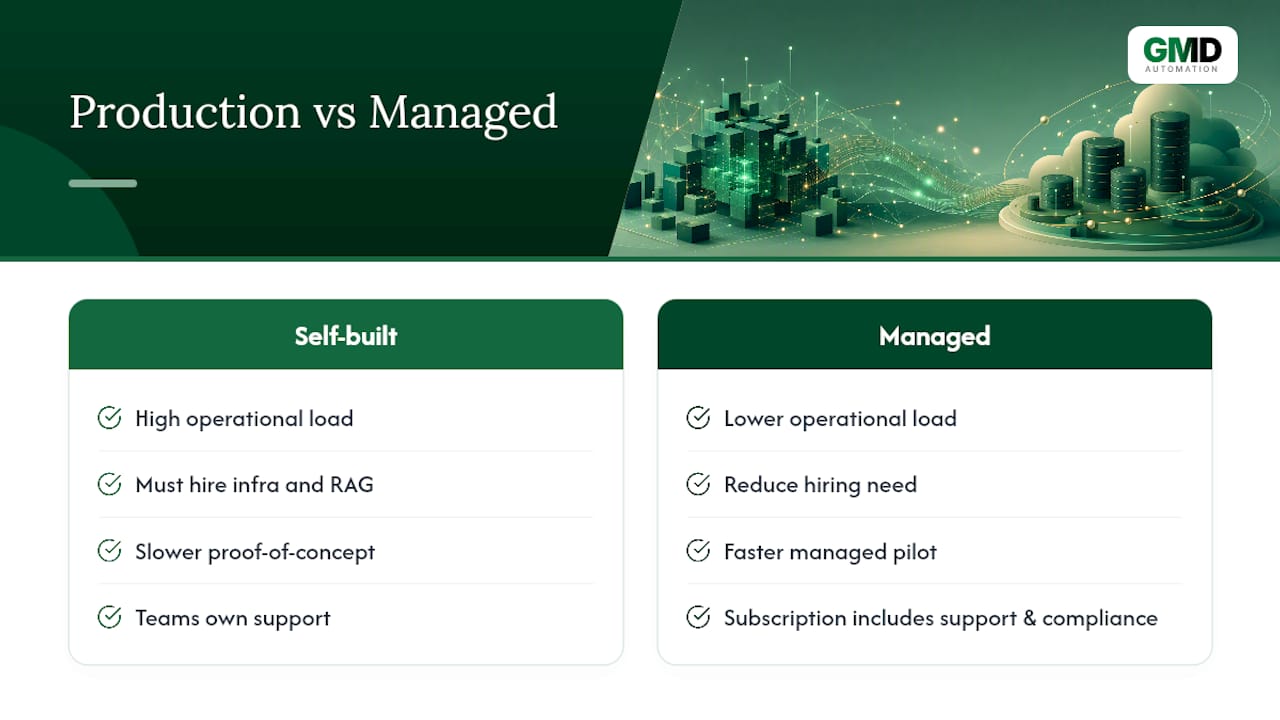
The gap most teams hit isn't the technology, it's the operational load: someone has to choose the index, monitor drift, tune the cache, and keep the pipeline patched. That's the gap a managed subscription model closes. Rather than hiring for vector infrastructure and RAG engineering from scratch, businesses can access scalable AI deployments through a supported route, with implementation, monitoring, and compliance already built into the monthly cost. For teams weighing deployment models, a managed pilot answers the "will this actually work for us" question faster than a self-built proof of concept usually does.
Where I'd start if I were prioritising this
Retrieval quality beats model size almost every time, so spend the first sprint testing retrieval against labelled queries before touching the LLM prompt. Run a pilot at representative load, not toy data, because index behaviour changes at scale in ways small tests never reveal. Keep embedding models, indexes, and the vector store loosely coupled. Whichever piece gets outdated first, and one always does, you'll want to swap it without rebuilding everything around it.
— Ravi
A managed route into vector search without the infrastructure build
Some providers give businesses a way into AI-powered search, recommendations, and automated response handling without hiring a team to run the vector infrastructure behind it. Where a self-built RAG pipeline demands index tuning, drift monitoring, and ongoing engineering time, managed systems deliver fully managed solutions on predictable monthly subscriptions, often including implementation, compliance, and optimisation with no upfront cost.
That matters most for teams handling high query volumes where response accuracy and speed both carry real business weight, customer enquiries, lead qualification, appointment booking. The services page sets out current offerings, including AI agents that answer, qualify, and book automatically. If a supported pilot sounds more practical than a build from scratch, that page is the place to start.
Sources
- Redis blog — vector database use cases
- YugabyteDB documentation — Hello RAG
- VectorDB survey — VLD B 2024 paper
- MongoDB case study — Delivery Hero
FAQ
Is the vector database still relevant given newer LLM context windows?
Yes. Longer context windows reduce how much you need to retrieve, but they don't remove the need for it: searching millions of documents for the right handful still requires an index, and stuffing an entire knowledge base into every prompt is far more expensive than retrieving the relevant slice first.
What are some real-life applications of vectors?
Vectors power product recommendations, customer support chatbots grounded in company documentation, fraud detection systems that flag unusual transaction patterns, and reverse image search. Delivery Hero uses vector search for realtime product recommendations with sub-second response times.
What are the top vector databases?
The field includes dedicated systems built specifically for vector search, vector extensions added to existing databases like PostgreSQL, and cloud-native databases with built-in vector features. The right choice depends on your scale, latency needs, and whether you need hybrid filtering alongside similarity search, not on any single "best" answer.
Is SQL a vector database?
Standard SQL databases aren't vector databases by default, but many now support vector search through extensions like pgvector, or through native vector features in cloud offerings. YugabyteDB's documentation shows a full RAG pipeline built this way, storing embeddings in a SQL-compatible store rather than a separate vector system.
Do I need a dedicated vector database to start experimenting with RAG?
No. Most teams can prototype RAG using a vector extension on a database they already run, then migrate to a dedicated vector database only once scale, latency, or hybrid-query complexity demands it. For teams that would rather skip the infrastructure decision altogether, Gmdautomation's managed services start from £300 per month.